Image file size and compression support
3 posts · Closed
Hello,
I just started using the RAM Drive software you are providing, and I am currently evaluating it. I created a small drive with a 500 MB volume that comes from an image created on an SSD. The image contains a single directory for browser cache, which is always empty because I set your software to never write to the image.
What perplexes me is that the IMG file is not compressed in any way, so basically it is a 500 MB file full of zeroes and just very little actual data. I tried to compress it to a simple ZIP file and it resulted in a ~500 KB file. There may be a problem that the file is read from the SSD after every boot and it is always a full 500 MB read. Much more economical would be to read this compressed copy, unzip it in memory, and use it in the RAM drive. Supporting simple compression like ZIP, for instance, would be very easy; with freely available libraries, it could take a skilled programmer just 20 minutes, plus 10 more minutes of testing.
I chose your software because I saw it's still in active development. That's really great because you can easily add this new feature. Would it be possible to use just a 1/1000th of the actual SSD space that the image uses now?
If you only have an empty folder for browser cache, there is no need to use image files at all. Simply configure the RAM disk without image and set it to create a folder for the browser. Then on every boot you will have an empty RAM disk with that folder used for the browser cache. This setup is faster and more reliable, since there is no need to load the image file.
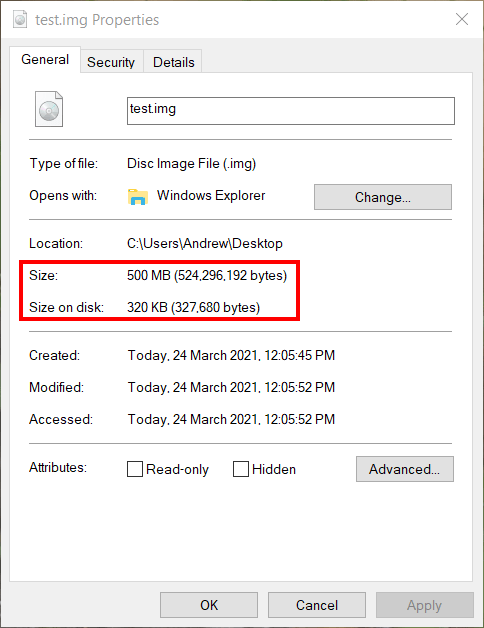
However, if you still want to use an image file, please note that since version 4.1 any newly created image file is a sparse file. It takes very little disk space, similar to what ZIP compression would achieve. Here is a test image to illustrate this:
Oh, thank you for schooling me. This software is deep!