Temp files still being created in C:\Windows\Temp
5 posts · Closed
I have installed the SoftPerfect RAM Disk application, made a disk in my RAM and put the folder path for the temp files to be stored in it (R:\temp in both fields).
When I check the path C:\Windows\Temp, the temp files are still created there. Am I doing something wrong?
Thanks.
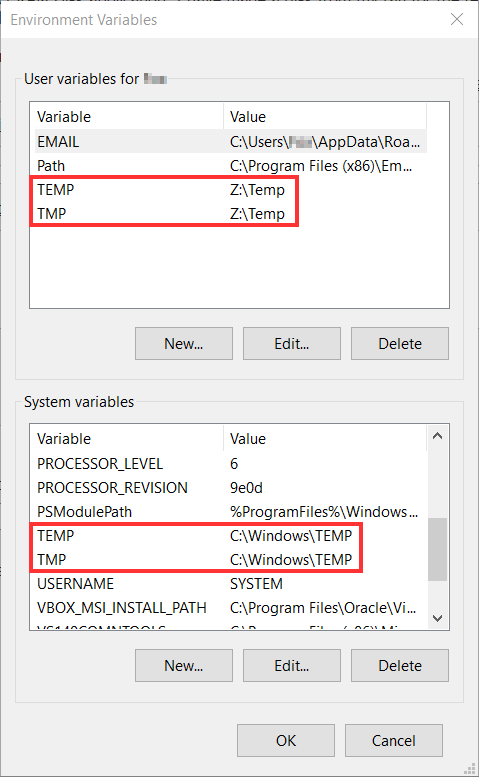
There are two kinds of TEMP environment variables in Windows: user-level and system-level. The former is used by regular applications you launch. The latter is used by the system and services.
When you change the TMP/TEMP variables from the RAM Disk app, it only modifies the user-level variables. This is done for safety, because the system-level temporary folders are crucial for normal operation. If system-level variables point to a RAM disk and for some reason the disk is not available, the system may fail or refuse to boot.
It is possible to override this manually and redirect the system-level TMP/TEMP to a RAM disk, but there is a risk of breaking the system. In most cases it should work fine though. If you want to try it out or inspect the variables, press Win + R (Run), type sysdm.cpl, then go to Advanced - Environment Variables:
Oh, I see. Thanks a lot.
I just created a RAMdisk because I have 24GB total RAM and I thought why not create and set the temp folders to extend the life of my SSD.
I don't know by capacity if it's helping to have only user variables temp.
Yes, moving just the user TEMP/TMP variables to the RAM disk will still help to reduce writing to your SSD while preserving the stability of the system.
The exact degree to which your SSD will be spared user-related writing operations would depend on what you use your computer for. If you do a lot of Internet browsing or use software products that generate large volumes of temporary files, the difference can be quite big.
I would suggest reading this old thread on how to use batch files to redirect TEMP/TMP content to a RAMdisk. It's a long thread, but well worth the read.