RAM FS drive cannot be indexed with Everything
5 posts
First of all, many thanks for this life-saver, keep on your excellent work! :)
Sadly my RAM FS drive Z: cannot be indexed with Everything from Voidtools - the fastest file search engine on Windows. Is there any possibility to bring this together, or are there some fundamental problems with that?
Kind regards from Switzerland,
René
Hi René,
Thank you for the kind words, much appreciated. :)
RAM File System reports itself as NTFS to Windows so that other applications treat it normally; but internally it is our own file system, not NTFS. It means there is no MFT and no USN journal inside it, and those are exactly what Everything reads when it indexes an NTFS volume at speed. So that particular route is not available.
The good news is that Everything has a second method it uses for non-NTFS volumes: it scans the volume once to build the index, then watches it for changes. It works perfectly well with our RAM FS. In Everything, simply go to Tools - Options - Folders, and add your RAM FS drive there (the Z: drive in your case).
In theory this is a little slower than reading NTFS structures directly, but on a RAM FS volume everything sits in memory and metadata access is extremely fast, so in practice you will not notice a difference.
All fine thanks for the reply. My RAM FS works as a drive with a letter Z. Voitools take it like any other drive, automatically, as an NTSF drive, and the I can't be removed. But if I add it manually as a folder, it has no option for watching for changes there. So at the moment it doesn't seem to be indexing. Not a big problem at the moment, but it would be good to resolve it. Hopefully Voidtools can find a solution (I tested with the latest version 1.4, and beta 1.5 too).
Kind regards
The automatic NTFS entry is what gets in the way. Here is our test setup: RAM FS sits on drive Z and Everything keeps adding Z to its NTFS list because the volume reports itself as NTFS. Even if you can't remove it there, you can tell Everything to ignore it.
There are two changes to make in Tools - Options:
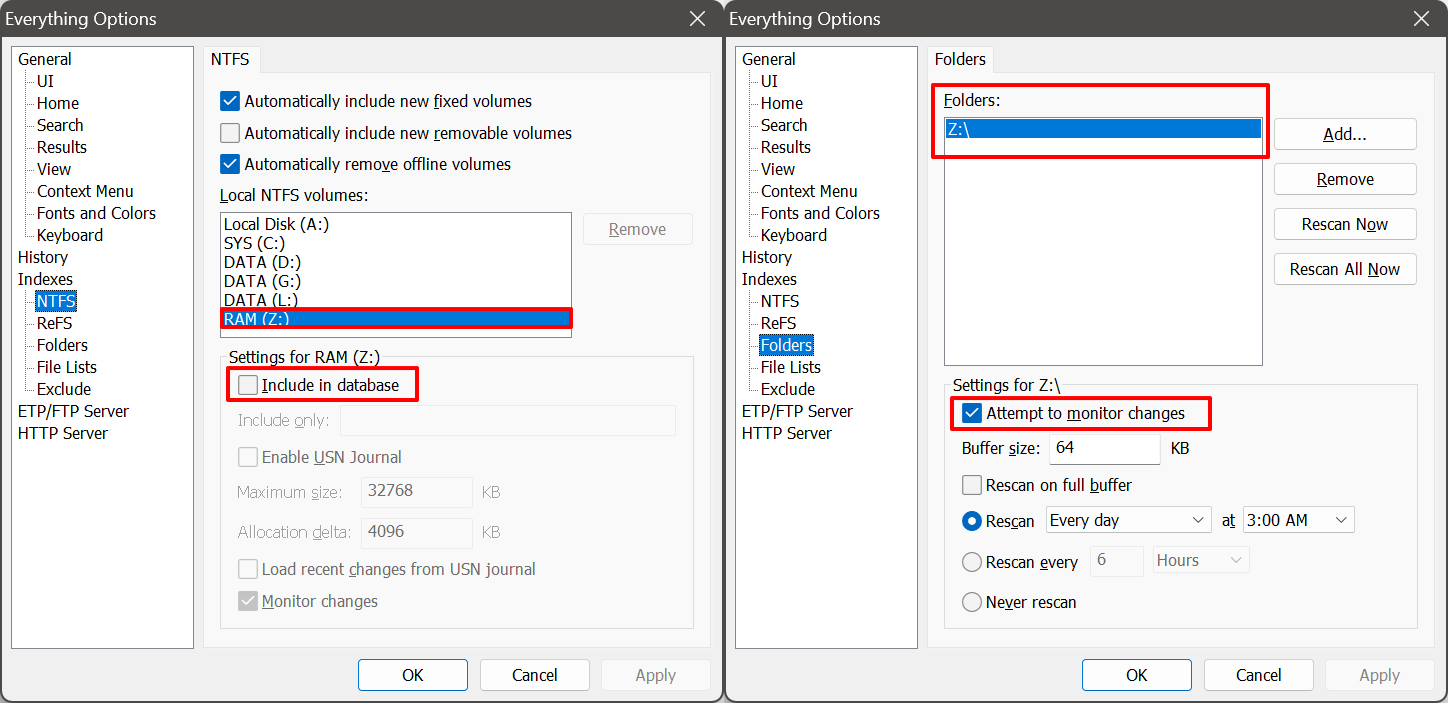
- Indexes - NTFS: select the RAM FS drive in the list of local NTFS volumes, then untick Include in database in the box underneath.
- Indexes - Folders: click Add and choose the RAM FS drive, then click the entry in the list and tick Attempt to monitor changes in the box underneath.
Here is how both pages should look when you're done:
Live updates then go through ReadDirectoryChanges and SHChangeNotifyRegister, which our driver supports, so the index keeps itself current instead of relying on the scheduled rescan.