Dismount without saving changes to disk image
3 posts
There are situations where unwanted data changes occur on the RAM volume, and I wouldn't want those changes to be saved back to the disk image upon dismounting.
Currently, the workaround requires creating a backup copy of the disk image, dismounting the RAM volume (which writes the unwanted changes to the image), replacing the modified image with the backup copy, and then mounting the RAM volume again.
I think adding a "Dismount without saving to image" feature (with a mandatory confirmation prompt) would be extremely useful. In such cases, one could simply dismount without saving and mount the disk again, effectively discarding all unwanted changes.
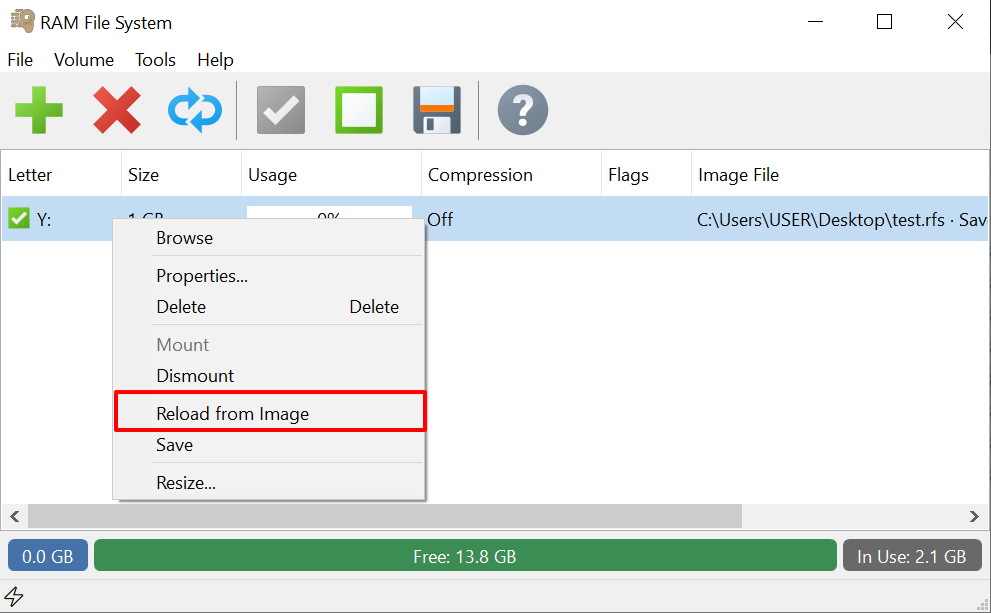
Thank you for the suggestion! This is now implemented in the latest development build, in a slightly different form that is more optimised as is doesn't require the remount step. Simply install the new build over your current version and reboot to activate the updated driver.
Instead of a separate "dismount without saving", there is a single Reload from Image command. After a confirmation that tells you when the image was last saved, it dismounts the volume without writing anything back and immediately mounts it again from the image.
So one click discards the unwanted changes and returns the volume to its last saved state, with no manual copying needed. If a program still has files open on the volume, the reload is refused with nothing changed, and the dialog names the program holding it.