RAM FS doesn't see that the drive letter is already used by VMware Shared Folder
3 posts
I noticed a small bug on a Windows 10 virtual machine in VMware Workstation.
Here is how to reproduce it:
- In VMware Workstation, set up a shared folder as a network drive, but disable shared folders in the VMware settings.
- Install RAM File System and try to add a new volume. RAM File System fails to detect that the drive letter is already assigned to 'Shared Folders (\\vmware-host)'.
However, if you install the RAM File System after the shared folder has already been mapped as a network drive, the RAM File System will correctly no longer offer to use the shared folder's drive letter.
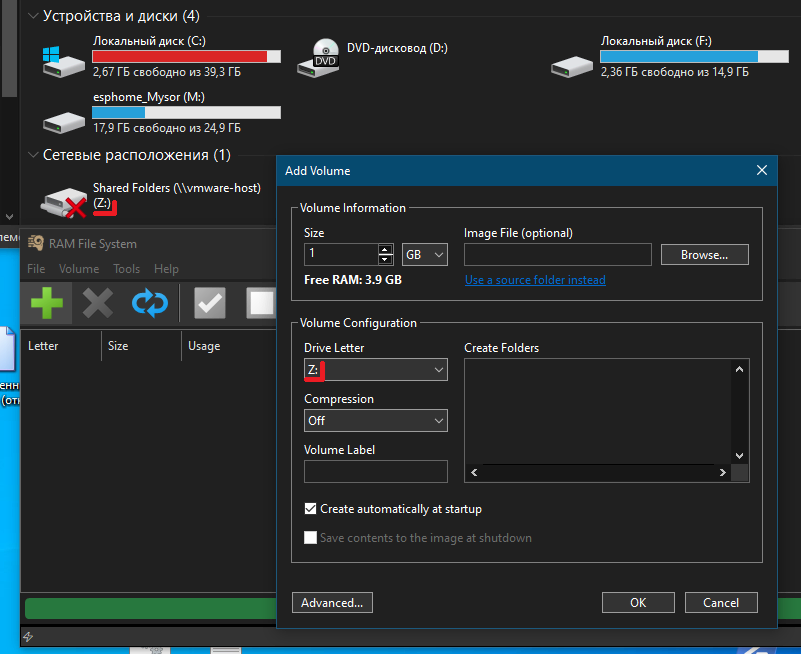
Thank you for the clear steps and the screenshot - it reproduced here exactly.
With shared folders switched off in VM, the mapping stays remembered. Windows Explorer still shows it, and it reclaims the letter as soon as sharing is switched back on, but no device answers on that letter, so the usual Windows checks reported the letter as free and allowed RAM FS to offer it.
In the latest build RAM File System also consults the remembered network connections, so such a letter is neither offered nor accepted. The same would have happened with any mapped drive whose server was offline.
One case remains: a volume created automatically at Windows startup will still take such a letter, since no user is logged on at that point and the mapping does not yet exist.