Prevent minifilter drivers from attaching to volume
7 posts
Hi,
I would like to make a feature suggestion for SoftPerfect RAM File System:
When I create a RAM File System volume, various minifilter drivers automatically attach to it.
In September 2023, Microsoft introduced Dev Drives in Windows 11. One key feature of Dev Drives is the option to mark a volume as trusted, which prevents minifilter drivers from attaching to it and significantly boosts developer file I/O operations.
Would it be possible to implement a setting or command-line switch in SoftPerfect RAM File System to prevent Windows minifilter drivers from attaching to a RAM File System volume?
From what I understand, this can be handled by adding a check within the driver's InstanceSetupCallback routine. When the Filter Manager invokes this callback for a new volume, returning STATUS_FLT_DO_NOT_ATTACH blocks the filter attachment.
Thanks in advance for your consideration.
Unfortunately it doesn't quite work that way. InstanceSetupCallback belongs to each minifilter, not to the file system underneath it. When Filter Manager offers a new volume to Defender or any other filter, it's that filter's own callback that decides whether to attach, and RAM File System has no say in it. A file system has no supported way to tell Windows which filters may attach to its volumes.
Dev Drive is the one exception, because there Filter Manager itself applies the allow-list you configure with fsutil devdrv. So a more promising route may be for a RAM File System volume to present itself to Windows as a trusted Dev Drive and let that existing policy do the work. Whether Windows will accept this from a volume that isn't ReFS needs some research, so we'll look into it and post an update here.
Good news: Windows does accept it. A RAM FS volume can tell Filter Manager that it is a trusted Dev Drive with no trust record, and Filter Manager then attaches no filters to it at all, antivirus included. We only borrow that part of the mechanism, so the volume does not otherwise behave as a Dev Drive. There is a test build for you to try. It installs over the current version.
After a reboot open a volume's properties, click Advanced and tick Do not attach filters, including antivirus, for maximum performance. It takes effect the next time the volume is mounted, and the volume then shows F in the flags column.
It needs Windows 11 22H2 or later, while on Windows 10 the option is greyed out. It is all or nothing, and files on the volume are not scanned in real time, so it suits build output, caches and temporary files.
The CrystalDiskMark results below compare a standard RAM FS volume with one without filters on Windows 11 24H2: small 4K reads are about a third faster and 4K writes up to twice as fast:
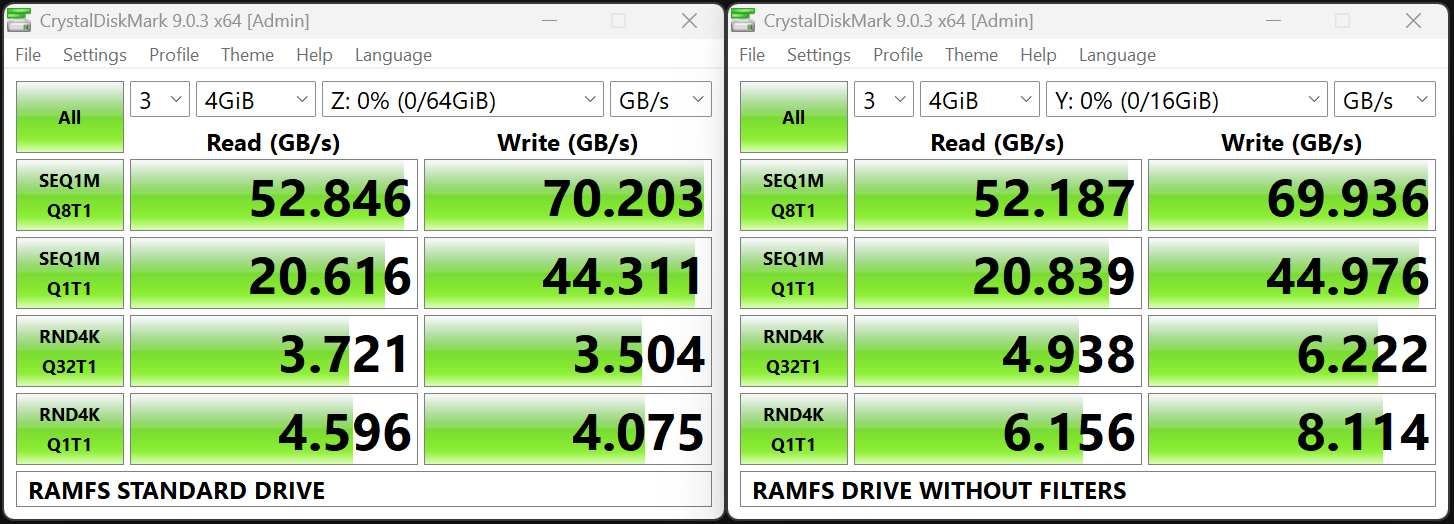
Let me know how it works for you.
It should work with any antivirus, not only Defender. With this option Windows attaches no file system filters to the volume at all, and that is how practically every antivirus scans files on access. Protection that doesn't rely on a file system filter, such as checks when a program starts, still applies.