RFS file on disk larger than memory used
2 posts
I have a 6 GB RAM FS volume that saves every 15 minutes.
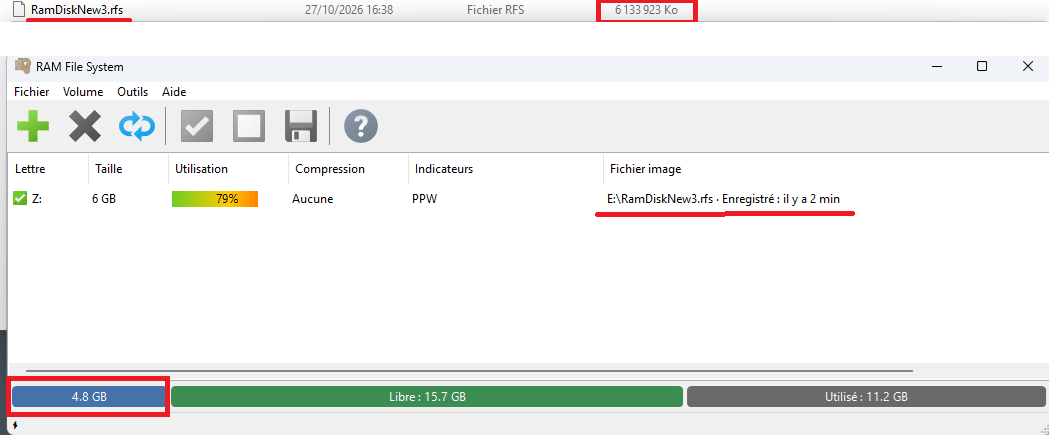
What puzzles me is that the RFS file on disk is much larger than the amount of memory actually used. In my case, Windows Explorer shows the RAM FS volume image/backup file size is 6133923 KB, while the main RAM FS window shows 79% used out of a total of 4.8 GB.
My question: what does the backup do? What will happen if I want to restore the image/backup to the RAM FS volume while the sizes are so different?
Thank you for your response.
You don't need to worry. Everything is fine with your RAM FS. The ~6GB that your Windows Explorer shows is the nominal length of the RAM FS image file, not the space it actually takes on the disk.
An RFS image is a sparse file: parts of it that hold no data take up no disk space, but Explorer's Size column still counts them. To see the real figure, right-click your .rfs file, choose Properties, and compare Size (Taille) with Size on disk (Taille sur le disque). Size on disk should be close to the 4.8 GB that your volume actually uses.
The nominal length is higher because saving is crash-safe. RAM FS never overwrites the previous save. Changed data is written to a free area of the file first, and the old copy is released only after the new save is complete. If the power fails during a save, the previous save is still intact and loads normally. The released areas become empty again, but the file keeps its highest length.
As for what the save does: it stores the files and folders on the volume, together with the volume's size, label and settings. After the first save, each periodic save writes only the parts that changed in the last 15 minutes, so it is quick and light on your SSD.
Restoring does not depend on the size of the image file. The image records that the volume is 6 GB, so when it is loaded, RAM FS creates a 6 GB volume and puts your files back exactly as they were. It is not a raw copy of the memory, so the file size and the volume size do not need to match.
One thing to keep in mind if you copy the .rfs file as a backup: some backup tools do not handle sparse files and write out the empty areas as real data, so the copy takes the full 6 GB. If you don't want to give it 6 GB, compress the image with 7-Zip or into a ZIP archive first. Archivers store only the real data.