Folder-backed RAM FS volume will not mount after a crash, "Drive letter is already in use" on every letter
5 posts
RAM FS caused a crazy slow GPF on my machine such that I had to force a shut down during a debug session. Now, I cannot mount D:\MFG_SVN\Intermediate to any drive letter. I uninstalled your product. I ran registry cleaners. I followed a dozen AI instructions. Nothing works. How do I get RAM FS to release the drive letter so I can reuse it?
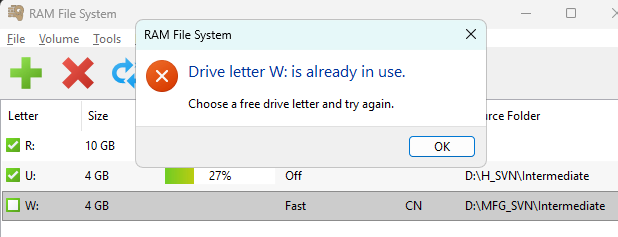
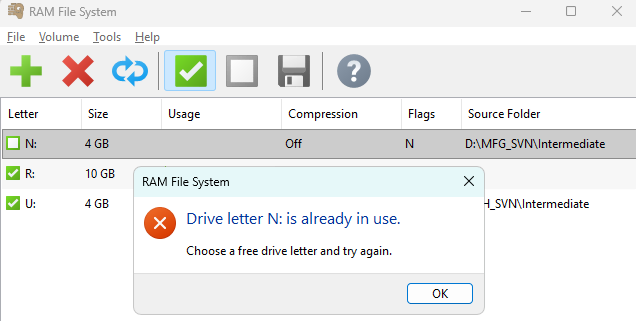
I'd like an explanation for how this fixed the problem. I renamed D:\MFG_SVN to D:\MFG, then created a new D:\MFG_SVN folder and moved everything from the renamed folder over. Then I was able to mount the location. How is this possible?
That last detail explains it, and it points at a fault of ours.
When a volume is backed by a source folder, RAM File System doesn't read that folder in place. It renames it aside, to a folder of the same name with .ramfs on the end, and puts the RAM volume where it used to be. It also writes a small record noting the swap is in effect, so it can put everything back afterwards, including after a crash.
What almost certainly happened is that your forced shutdown left the renamed folder on disk, but the record of the swap didn't survive the power loss. On the next start RAM File System found a .ramfs folder it had no record of. It won't touch such a folder, because it can't tell whether it's ours or yours and deleting or merging it would risk your data, so it refused to mount.
That refusal was reported as "Drive letter is already in use", which is simply wrong and sent you looking at drive letters. The letter was never the problem, which is why no letter worked. Your rename worked because the new folder had no .ramfs folder beside it, so there was nothing to refuse.
Your data from before the crash is in that Intermediate.ramfs folder, so please check what's in it before deleting anything in the tree you renamed. The uninstall and registry cleaning didn't cause this either; the mount was already failing before you tried them.
We're fixing three things: making the swap record survive a power loss, letting recovery work whichever drive letter you use, and correcting that misleading message.
One question, if you would. When the machine went bad, did it freeze, with everything gradually stopping and the mouse skipping across the screen until you needed the power button, rather than blue-screen? We've just fixed a separate fault that does exactly that on machines with mapped network drives, and if that's what you saw, I can send you a build with the fix.
Andrew,
Thank you for the great explanation. It never occurred to me that there might be a hidden file somewhere.
And the mouse "skips" across the screen? Yes! That is exactly the slow death I experienced three times today. Please send me the fix! I was blaming Cursor during heavy debug sessions for it. Oops.
I've been a customer using your RAM Disk for many years now. But let me say that RAM FS absolutely *ROCKS*! Using a junction to map my compiler's Intermediate output to a RAM disk? GENIUS! That alone will save many dozens of terabytes of writes to my SSD RAID-0 array. And no OS file system in the way? Even better!
Alan
Thanks for the kind words :) RAM File System is a technically complex product, so please forgive the occasional hiccup. We try to track them down and fix them as quickly as we can.
Both faults are fixed, along with a few others found on the way:
- Fixed a system freeze when mounting or dismounting a volume alongside a stale network drive.
- Fixed folder-backed volumes failing to mount after an unexpected crash or power loss. The error now names the hidden
.ramfsfolder instead of the drive letter. - Fixed "disk full" errors with pre-allocated files on nearly full volumes.
- Fixed FAR Manager 2.x failing to copy empty folders from a volume.
- Fixed intermittent mount failures when quickly re-creating a volume using the same drive letter.
- Added a Reload action to re-mount a volume from its image or source folder, discarding any changes.
All of these are in RAM File System 26.9 and later. Get the current version from the RAM File System page, install it over your existing one and reboot so the new driver is loaded.