Cannot mount RFS image from external exFAT SSD: marking the image sparse failed
2 posts
I want to use a RAM FS on two computers which are not connected via a network.
I thought of creating a rfs file on an external SSD.
I would connect the SSD to one computer, mount the rfs file and work with it.
Then store the RAM FS contents into the rfs file, disconnect the external SSD from the first computer and go to the second computer.
On the second computer, connect the ext SSD, mount the rfs file, etc.
However, when I try to mount the rfs, I get the message (print screen added):
"Unable to mount.
Not supported by driver (error 1)
Image file . .
marking the file sparse failed"
Is this expected behavior and if not, can this be solved?
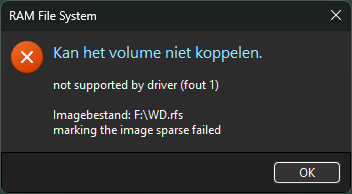
That is because the SSD is formatted as exFAT (or FAT32), as most portable drives are out of the box. A RAM FS image is a sparse file, so only the parts holding data take up disk space, and exFAT and FAT32 do not support sparse files. You can check under the drive's Properties → File system.
The simplest fix is to format the SSD as NTFS (this erases it, so copy your files off first), or create a separate NTFS partition for the image in Disk Management. Then you can mount the image straight from the SSD on either computer.
If the drive has to stay exFAT, keep the image on each computer's internal disk instead. After unmounting the volume, copy the .rfs file to the SSD, and on the other computer copy it back to the internal disk and mount it there. On exFAT the copy can be much larger than the image, because the empty sparse areas are written out as real data, so it is better to compress the image with 7-Zip or into a ZIP archive first.