Exclude TEMP from the saved image, and save the volume periodically
2 posts
Hello,
I have been using AIM Toolkit for many years, which provides a stable solution that has helped me keep my SSDs in good condition for a long time.
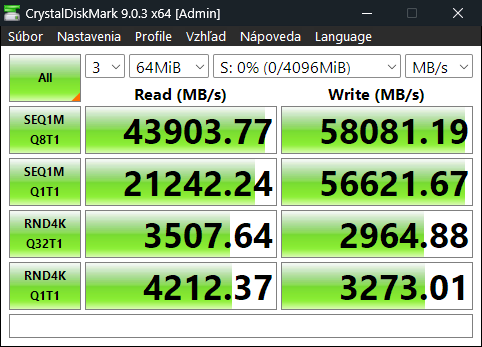
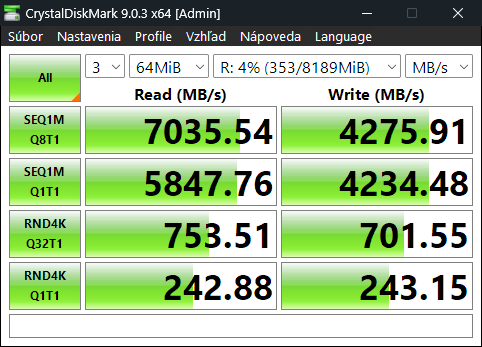
Only today I discovered that you have a new solution, RamFS, and I have checked its capabilities and I am very impressed - you can see the comparison attached.
I have 2 questions:
- I am interested in saving the file content in RamFS when shutting down the computer, BUT WITHOUT the TEMP directory. Simply, I would like to choose whether to save to an image on a physical disk (SSD) the files in the root, the files in TEMP, or files in other folders created there. Some of them yes and some of them not. In any case, all that is in the root: YES; and all that is in TEMP/TMP: not. And maybe
- Is it possible to regularly save the contents of RamFS to an image (not only when shutting down the computer)?
Leaving some folders out of the saved image is not possible. The image is saved by changed memory regions rather than file by file, so it always holds the whole volume.
What you describe is done with two volumes, say P: for persistent and V: for volatile. P: is bound to an image, or mirrors a folder on the SSD, with Save contents at shutdown on, and holds the files you want to keep. V: has saving off and Temp in its Create folders list, and Tools → Set Windows Temporary Folder points TEMP and TMP at it.
There is no downside to having two volumes. They are thin and take memory only as they fill, so two 8 GB volumes cost no more than one, and you get a clear separation: whatever is on P: survives, whatever lands on V: is gone after a restart.
As for periodic saving, yes. The volume's Advanced... options have Save contents every N minutes, which requires Save contents at shutdown to be on. After the first save only the 2 MB regions changed since the last one are written, so it is quick and light on the SSD. From the command line it is the period= keyword of ramfsctl auto add, in seconds.