Ping Monitor: check a TCP port, and email alerts failing with QQ Mail SMTP
5 posts
Hello, I really like this software. Could you add a function for TCP port detection, such as www.google.com 443? This way, I can also check if my program's port is in a listening state. Thank you
Good idea, a TCP port check would suit the program well.
I want to think it through first, though. There'll be other things worth checking one day, an HTTP request for example, and I'd rather build it so those can be added later than bolt a port check on the side. No date yet, but it's on my list.
It's done: Ping Monitor 26.8 adds optional TCP and HTTP/S probes per host. Right-click a host, choose Edit, click Probes and then Add.
For your own program a TCP port probe is the right one. For something like www.google.com 443 I'd use an HTTP/S probe instead. It checks that the server actually answers with the status code you expect, and optionally that the page contains a given text, rather than only that the port is open. A port can accept a connection while the service behind it is broken.
A host whose probe fails turns amber instead of red, and there's a Failed probes alert in File → Settings → Alerts.
You can get it from the Ping Monitor page.
The response speed is too fast. Thank you for adding new features to the program.
I intend to conduct a test, but an error occurred in the configuration for sending emails. I am using an email address from https://mail.qq.com/ and have enabled the SMTP outbound protocol, with the correct username and password, and all relevant settings are correct. However, the test failed. I wonder if it is caused by the program supporting a lower TLS protocol. With the same configuration, I can send emails on behalf of others in other programs. I wonder if you could help investigate this issue. Thank you.
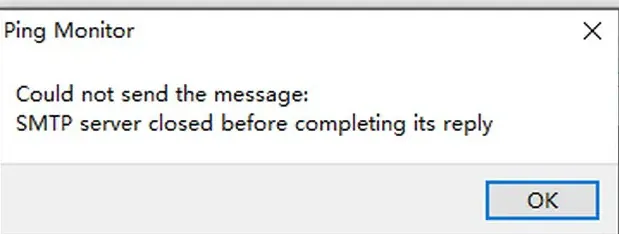
It wasn't the TLS version. When QQ advertised XOAUTH2, Ping Monitor picked it even though you'd given it an ordinary SMTP password. It now uses XOAUTH2 only when it's selected explicitly, and otherwise sticks to the usual password methods.
The fix is in Ping Monitor 26.10, on the Ping Monitor page. Install it over your current copy and try the same email settings again.
For QQ, use your full email address as the username and your QQ SMTP authorisation code as the password, not the regular account password. We tested it with both of QQ's setups: port 465 with TLS encryption and port 587 with STARTTLS.