Suggestion for disk view hierarchy or parent folder column
10 posts
I just noticed this new application and gave it a quick look.
I initially added my 'Virtual Machines' folder that contains many subfolders - one for each VM. As I don't use the VM name in the disk name, the result is a long list of images, and I have no clue where they belong unless I do a 'Show in folder'.
So my UX suggestion is that it would be helpful if it showed the disks in either a hierarchy or with a possibly optional column showing the parent folder so I could sort by them.
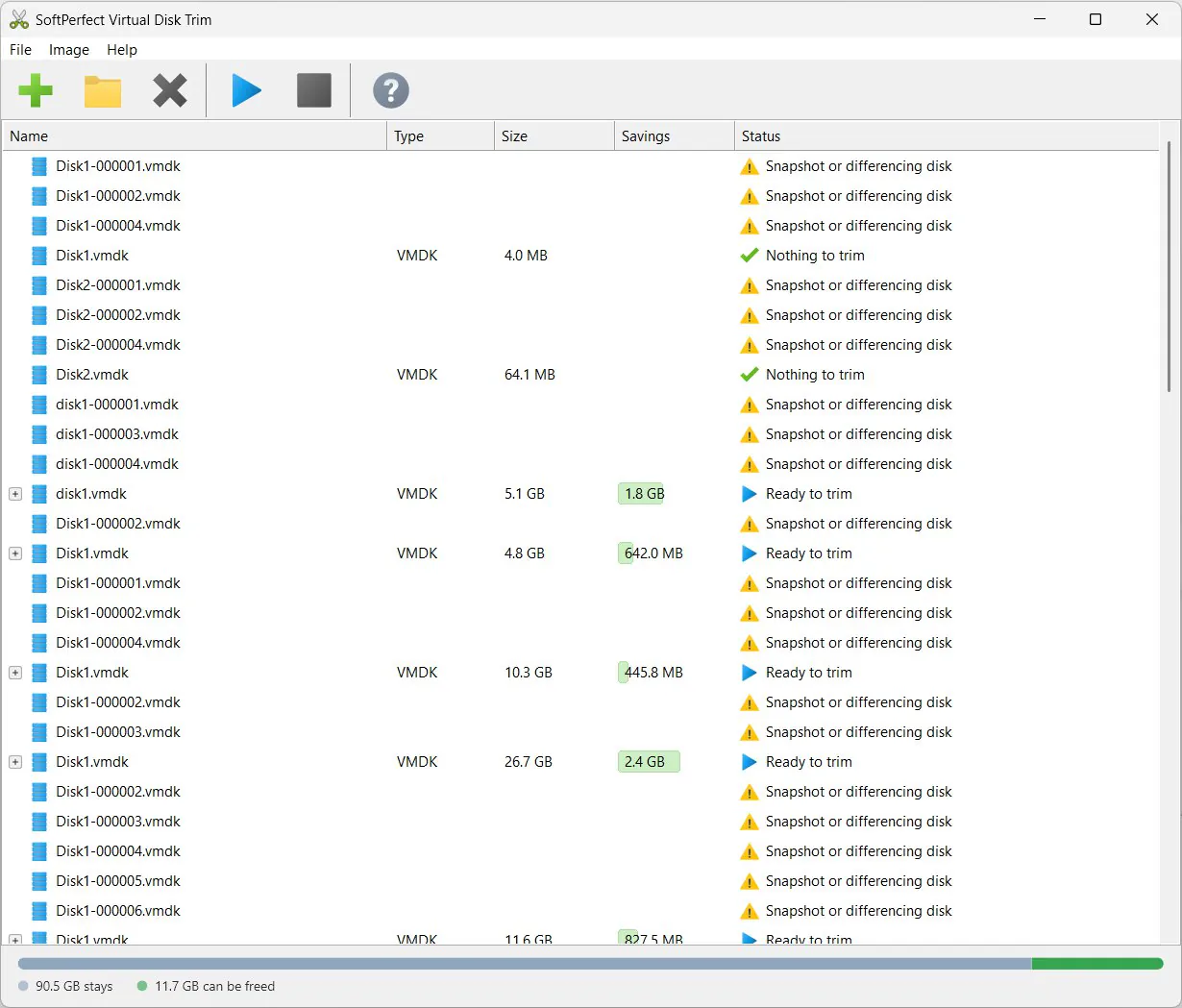
Good point, thanks! We'll add an option to show the full path of each image, so sorting by name would keep each VM's disks together.
We've also found that trimming disks of suspended VMs, or disks with snapshots taken while the VM was running, may not be safe. We'll add detection for this where possible. Until then, please only trim disks of VMs that were properly shut down, and whose snapshots, if any, were also taken while the VM was off.
A newer build with these improvements is now in snapshots:
- View → Show Full Paths puts each image's full path in the Name column, so sorting by name keeps each VM's disks together.
- View → Show Unsupported Images can be turned off to hide what can't be trimmed, such as snapshot disks like Disk1-000001.vmdk, leaving just the base disks.
- Disks of suspended VMs are now declined, as are volumes from a guest that was hibernated or not shut down cleanly.
- A base disk with snapshots is still trimmed, but its page, swap and hibernation files are kept, because a snapshot with saved memory still relies on them.
- A disk that a running hypervisor still has open is now refused in most cases.
- ReFS volumes versions 3.1 to 3.14 are now supported.
Shutting a VM down before trimming its disks is still the safest way, but these checks now catch the usual slips.
Those changes make it a lot cleaner to view and easier to work with, especially my dev work VMs where some have many snapshots.
One minor point is that an encrypted vmdk file is not supported and shown as 'Not a disk image'. I'm not sure if working with those is a lot of work and not an issue for me, but detecting it as an encrypted disk image would avoid confusion when seeing that 'Not a disk image' label.
Good catch on encrypted disks. A newer build in snapshots now recognises VMware's encryption, so those disks show as "Encrypted" instead of "Not a disk image", and the same goes for their snapshot disks and the pieces of a split disk. It also spots disks VirtualBox encrypted, which it learns from the VM's .vbox file.
Trimming them isn't possible yet, though: without the VM's password the contents can't be read (as that's the whole point of encryption), so there's no telling used space from free. Turning off View → Show Unsupported Images keeps them out of the list.
Thanks, I can confirm encrypted VMware VMs are correctly detected for me.
Apologies - I have two more UI suggestions:
1) A refresh button would be really handy:
I am doing my first actual trim tests today and Virtual Disk Trim list highlighted that I really need to delete some of the snapshots for old project VMs and I used VMware Workstation to clean-up. However, currently in VDT I need to either remove all VMs and re-add the folder or restart the application and load the folder again. Just re-adding the current folder doesn't update the list.
2) Given the above I was re-adding folders a few times and while the Add Folder dialog shows the last folder, I have more than one folder with groups of virtual machines. Hence a recent folder list would help.
Just realised I need a license to actually do trims and as the card I would use charges extra on the weekend for currency conversions that will have to wait till Monday as it makes enough of a difference for app and lifetime updates to buy a few beers!
No need to apologise: we appreciate such suggestions, as they are helpful to many other users as well.
The refresh feature is now available via menu View → Refresh, F5 key, or the Refresh toolbar button. It re-scans the added folders, picks up new disks, drops the ones that were deleted, such as snapshots you cleaned up in Workstation, and analyses the rest again, so the list matches what's on disk without the need to re-add anything. Adding a folder or disk that's already listed now refreshes it as well.
It's in the latest build in snapshots.
Thanks, tried the refresh and reload and all works well.
A couple more suggestions:
1) Although I use various virtualisation systems in my home lab, its my personal dev work VMware VMs that need the most tidying and cleaning up of snapshots. Even though VDT cannot trim the snapshots it would be helpful it VDT showed their disk size so I can see where to check in Workstation. This would make it more useful to help me manage them without using other tools.
2) VDT doesn't remember its main window position unlike RamFS, RamDisk and Network Scanner. I have a lot of monitors and usually place utilities on side or top monitors so it would be good for it to remember without having to use a third party positioning utility.
I haven't got a licence yet so haven't been able to test trimming various VM types.
Thanks for testing, both are fair points.
Snapshot sizes: this one's easy. Snapshot disks are declined before they're analysed, which is why their Size column is empty, but we can still show how much space they take. Would the size of each snapshot disk be enough, or would a total for each VM be more useful?
Trimming snapshot disks is possible in theory. The most realistic case is the newest one on a VM that was shut down, which holds everything written since the last snapshot. Trimming it would free the space of files deleted since then and leave the snapshot itself untouched, so you could still go back to it. It would take new code, as we don't read or write snapshot disks at the moment.
Is that your situation, VMs that have grown since a snapshot you want to keep? Or are these mostly old snapshots you no longer need? Those you can already delete in Workstation and then trim the disk.
Window position: at the moment we only save the window's size, and it reopens centred on the monitor it starts on. Saving the position has its own issues: when a monitor is disconnected or rearranged, the saved spot can end up off screen, so it needs extra handling and additional code.
Snapshot Sizes: Just the size of each snapshot is fine (the total of all its files if split). With split disk files there can be a lot of files per VM after a few snapshots so it's not simple a quick look in Explorer/DOpus to know which snapshot to consider for removal in VMware. I don't manage my dev VM disks/snapshots in the same careful way I do my home lab servers and hence they often end up taking up huge amounts of storage needlessly. This means a tool that can not only trim some parts, but also show where the space is used in a simple manner so I can tidy up in Workstation is useful.
I don't see the need to trim snapshots generally (unless trivial to do) as they shouldn't be retained for too long on any regularly used/production system which I presume is your main target.
Window Position: I appreciate its a can of worms as I often turn off a couple of my monitors to save electricity when not needed and have written code around this on/off, scaling, docking and re-ordering issue myself. However your other apps I mentioned can show off the viewable monitors so also lack these checks (its easy enough to move them back). For me that's better than always centre but that may not apply to all users. I use WindowManager for this type of issue and can set that to do it.