Icon remains in taskbar when minimised to tray
4 posts · Closed
In Settings->Basic under UI behavior I have "When minimised show in the notification area" checked.
My question is, shouldn't the icon in the taskbar area go away when minimised to system tray?
I just upgraded from 2.1.2 to the current 2.2.1 and I seem to remember it hiding when minimised.
In the earlier version 2.1.2, the behavior for minimizing and closing the app was somewhat inconsistent. Both actions would send the app to the notification area, which could be confusing for some users.
In version 2.2.1, we've made changes to better differentiate between minimization and closing actions. Now, when you minimize the app, it will simply be minimized to the taskbar as is typical behavior for most applications. However, you can configure the close button to send the app to the notification area. This way, the app can't be accidentally closed and can continue to monitor your network in the background.
Furthermore, in the latest builds we have renamed the setting to make it clear what it does. We made this change to improve the user experience and to clarify the difference between minimizing the application and closing it to the notification area:
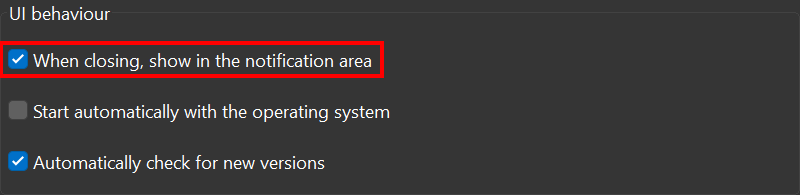
I am using 2.2.1 and my setting setting screen reads "When minimised show in the notification area".
But now I know to close the window instead.
I will download the latest build from today 9/5/2023.
Can you also explain how I can attach images to the forum?
Thanks
To be able to attach images in this forum you could either create an account or use any image-hosting service like imgur to upload a screen shot and post a link to it.