Whitelisting not working with VMWare MAC addresses
9 posts · Closed
New to the product, but not new to technology, etc. Found something that I am not able to resolve. I use VMware Workstation, and am not able to get the whitelisting working. Every time I reboot, VMware assigns new MAC addresses, and I do not want to deal with trying to make these static.
I have tried entering the MAC address "partial match" a number of different ways, but every time I reboot my host, WiFi Guard barks at me with these new "new" unknown MAC addresses. Does the whitelisting by MAC address not actually work as expected?
I have tried XX:XX:XX and XXXXXX and neither seem to work.
Thank you for reporting this issue. We have identified and fixed the bug where adding a MAC address prefix for partial matching did not automatically recognise previously discovered MAC addresses as known.
Please download the new build and re-enter the first three octets of the MAC addresses you wish to whitelist.
The issue persists. Below is a link to the screenshot. Please let me know if I am doing something incorrect.
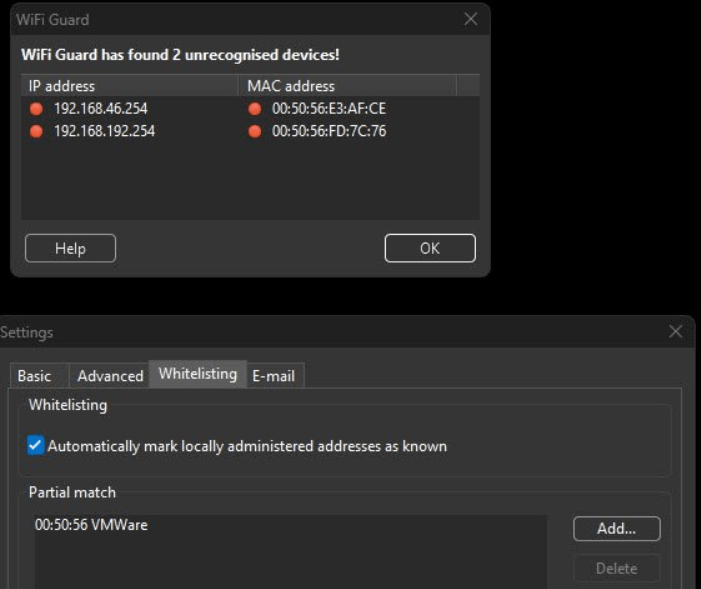
Apologies, it appears that even though the list of known devices was updated with a partial match, it wasn't saved. Consequently, after a reboot, WiFi Guard would identify these addresses as unknown once more.
We have recently resolved this issue. Please download the latest build, dated January 17, and re-enter the partial MAC address. This means you should delete the existing entry for VMWare and add it again.
This is crazy. The issue is still happening. The only way it works is after the scan where the MACs show up as offending is if I open up the whitelisting tab and uncheck the "automatically mark locally..." and then check it again. When I do that, they go green, but it is not happening after a reboot and after the next scan. Seems there is still more work to do here guys.
That is indeed odd. Could you please send us the database file?
To do so, follow these steps:
- Press Win + R and open %APPDATA%\SoftPerfect
- Compress the WiFi Guard folder into a ZIP file
- Submit it to us using this form
We will then review it and hopefully determine the issue.
It's been 2 days. Just wondering if you received my upload with my settings.
Yes, we have responded to you via the same facility where you uploaded the files. But perhaps you haven't received or missed the notification email.
The file with your settings helped us to find another edge case where the partial MAC address matching would not work. Please download the new build dated 23 January and let us know how it works for you.
My apologies. I did miss that message. After installing the latest and rebooting, it looks like the issue has been resolved.
Thanks again for the quick turn around and attention to this. Keep on making these awesome products!