Increased vertical space between devices in main list
8 posts
In WiFi Guard v25.12, the vertical space between devices in the main list has increased, such that my 30 devices almost fill the screen top to bottom. Please introduce an option to reduce this space, so that it's more like the previous version.
Otherwise, v25.12 is a nice visual improvement
We've increased the row spacing to improve readability with the icons: multiple icons per row can look quite crowded otherwise. However, we understand this presents a challenge for users with larger networks (like your 30 devices). So we've added a setting for Row Spacing in the latest builds:
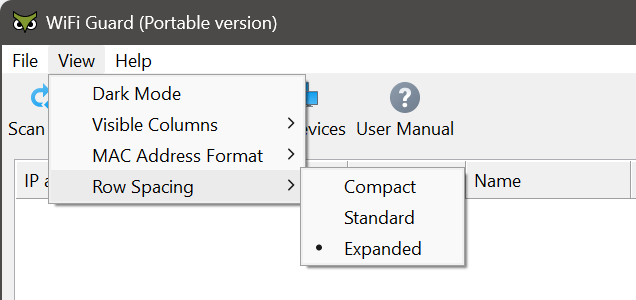
The compact mode works well. Thanks to you and the rest of the team for your hard work and timely responsiveness.
A small buffer needs to be added above the first entry in compact mode, as the data is uncomfortably close to the column headings.
I've discovered that using compact mode results in the lower third of the last entry not being visible, even when using the scrollbar arrows. Please fix this.
Thank you for reporting this. We've been able to reproduce it — it's just a minor display issue with the scroll range in compact mode.
The fix will be included in the next update. In the meantime you can download the interim builds that contain the fix alongside with removed 32-bit Windows support and added Windows on ARM64 support.