Program crashes when clicking OK on new IP error
6 posts · Closed
Good morning.
I am a registered user of WiFi Guard V2.0.1 and I am constantly getting the attached error message whenever WG detects a new IP address. If I click the OK button (to ignore the newly discovered IP address), the program closes and exits to the desktop immediately. If I launch WG again, the moment it scans this newly identified IP, the error message appears again.
I am using Windows 10 (all latest Windows updates installed). Can you please help me troubleshoot this problem?
Thank you
Kind regards,
Salim
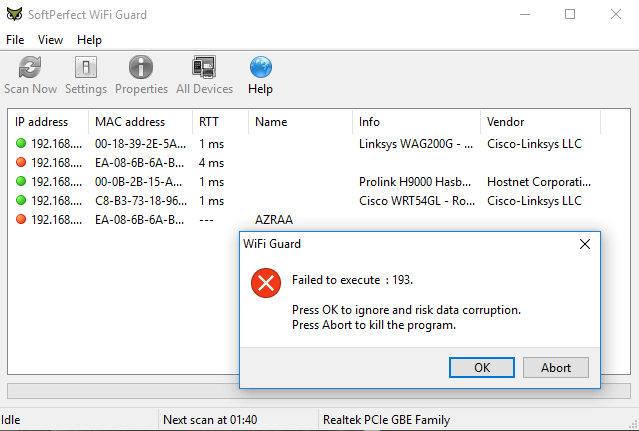
It looks like you have something set to be executed on detection that is not a valid executable file.
Please check the Advanced tab in WiFi Guard's settings, and either empty the "Execute command on detection" field or specify a valid EXE file there:
[image: https://i.imgur.com/XJBZrk6.png]
Dear Andrew,
Thanks for replying.
100% correct ! I mistakenly put a *.wav sound in this line as well. I removed it and it works like a charm. Many thanks again.
I would like to know if it is possible to get the IP Address in the 'All Devices' window. This would really help. The issue is most of the times I have to release and renew my DHCP addresses and in doing this, all the current IP related devices tend be assigned new addresses but keeping the MAC address the same. If in the 'All Devices' tab, it could keep a log of the IP address, it would me easier to understand and interpret the information.
Please do let me know if there is one way or another to get this, apart from having to keep track and add them manually in the 'Properties' tab.
Thank you
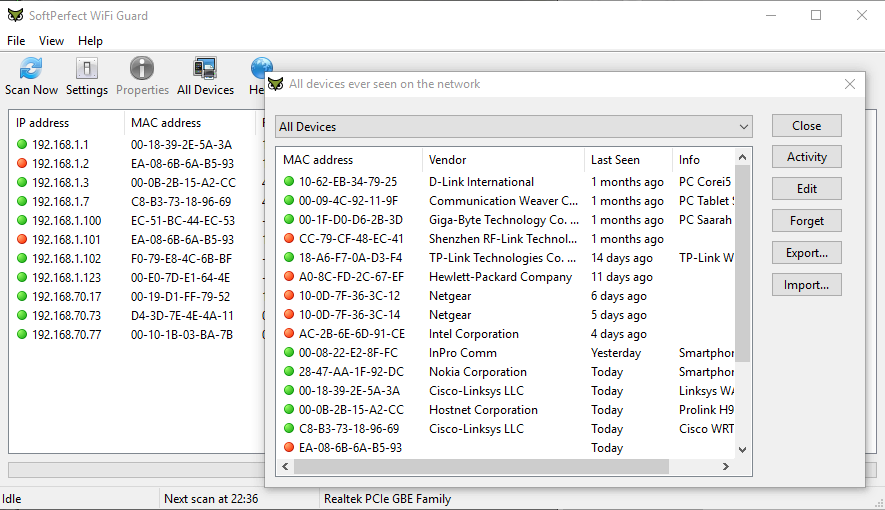

That's actually a good idea. Since allocated IP addresses can change over time, it makes sense to record and display them in the Activity window.
In the screen shot below, we've added IP addresses to be shown next to day and hour they were detected.
We'll include this feature in a new version soon.
[image: https://i.imgur.com/NAdxnLP.png]

Dear Andrew,
This is Wonderful! Thank you for considering the idea in your next release. Will be waiting eagerly.
All the very best to you and to the team.
Thanks again,
Salim
We have included the changes in version 2.0.2. You can download a copy from WiFi Guard home page and install over your current installation.
Once again, thank you for this useful suggestion!