No devices show up in the scan list
5 posts · Closed
When I am trying to scan with WiFi Guard, no devices show up in the list. What can be the problem?
There can be a few reasons for that. Please have a look at this "WiFi Guard doesn't see some or any devices on my network" article, which lists the causes and solutions.
If this does not help to resolve the issue, please attach some screen shots illustrating the problem: from the "All devices ever seen on-line" window and the main window after a scan.
Thank you for your response.
I have tried that article suggestions, but unfortunately without any luck. I have also talked to the support guy for my router (Jensen Lynx 7000) but there are no settings there which blocking my WiFi Guard.
I can only get up a list with MAC addresses. No IP addresses. And I cannot see which units are active or which are not, because they all have green lights, even they are turned off. Nothing shows up when I do scanning.
[Attachment: WiFi Guard screen shot]
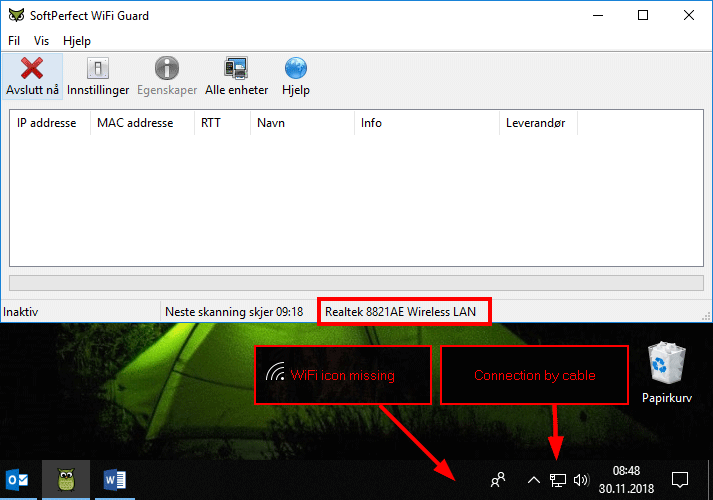
From your screen shots, it looks like you are connected by cable rather than WiFi, whereas your WiFi Guard is configured to use a WiFi card.
This is basically the situation described in the article as:
An incorrect network adapter was chosen in WiFi Guard settings. Make sure it is an active adapter connected to WiFi or cable.
To fix the issue, simply choose a different network card in WiFi Guard settings, or activate the WiFi connection.
Below is your screen shot with the problem areas highlighted:
- The notification area indicates that your computer is connected by cable.
- Your computer is not connected via the wireless connection, as the WiFi icon is missing from the notification area.
- Yet your WiFi Guard is configured to use Realtek Wireless LAN adapter.
Thank you! It is working fine now.