How to clear all old MAC addresses
4 posts · Closed
Henry Guest
How do I clear all old MAC addresses in WiFi Guard?
I am using Windows 10.
Ann SoftPerfect
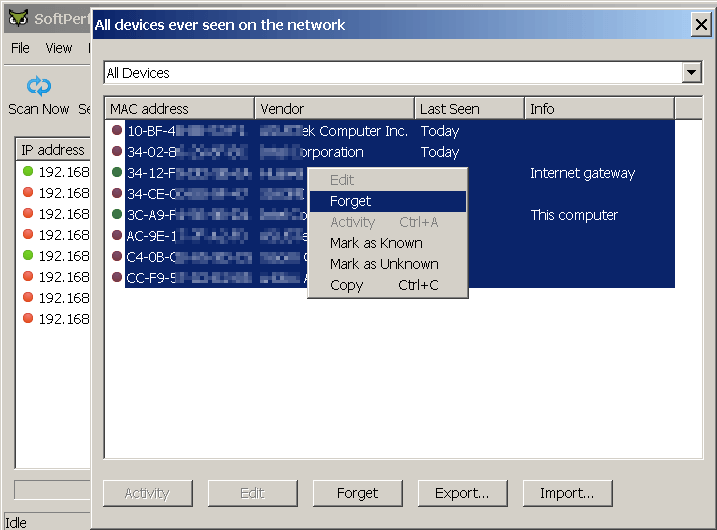
Simply go to "All Devices" and select all the MAC addresses you want to delete. Then right-click the selection and choose Forget as shown below:
Henry Guest
I'm sorry I guess I wasn't very clear in my first message. I have been clearing them with 'Forget' one at a time. It's just that I have over a hundred of them and wanted to clear them all at once. Thanks
Ann SoftPerfect
To clear addresses all at once, you simply need to select them all before clicking 'Forget'. The selection can be done in a few ways:
- Hold Ctrl and select the lines with with the mouse; or
- Hold Shift and click with the mouse on the first and then the last line to be selected; or
- Hold Shift and use the Up and Down keyboard keys; or
- Press Ctrl + A to select everything.
These keyboard shortcuts are applicable to most Windows applications.
This topic is closed.
It has had no new posts for over a year, so the software versions it talks about may be out of date.
Start a new topic in WiFi Guard if you have a similar question.