Device limit and email notification issues
2 posts · Closed
Franz Guest
WFG would be excellent for my network provided the following:
- The number of devices to be searched for must not be limited to 32, but at least up to 100.
- The function to send an email when an unknown device is discovered should work. I always get errors when I test mail with my StartMail account.
Thank you
Ann SoftPerfect
WiFi Guard already satisfies both your wishes:
- The device limit setting you are referring to merely sets how many devices are to be scanned simultaneously, i.e. in parallel. It is otherwise known as the number of threads, and is there to give users a choice of how much of their computer resources WFG can use. It does not restrict the total number of devices that can be discovered in your network, even if it has hundreds of devices.
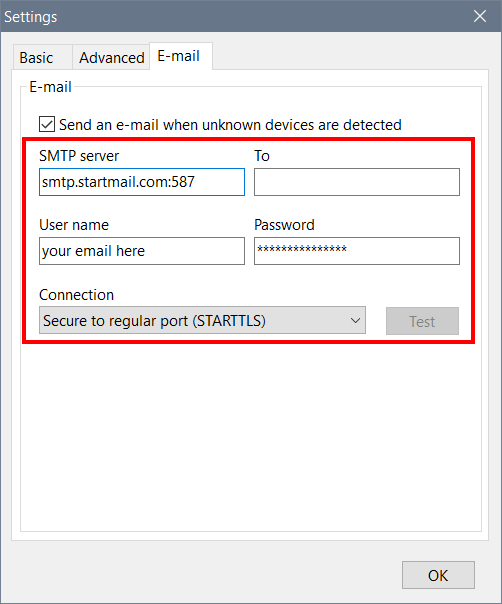
- Regarding mail sending, if you see any errors, it is most likely because the settings you entered for your email provider are incorrect. Here are instructions for your service supplied by your startmail.com provider: StartMail server addresses. It is important to pay attention to the precise address of the outgoing mail server, port number and authentication type. In your particular case SMTP server should be set to smtp.startmail.com:587 (outgoing mail server address followed by a colon and the port number your provider uses), and the connection type set to STARTTLS.
Here is a sample screen shot of email settings:
This topic is closed.
It has had no new posts for over a year, so the software versions it talks about may be out of date.
Start a new topic in WiFi Guard if you have a similar question.