VIP names overwritten by MAC address names
3 posts · Closed
I recently purchased WiFi Guard and noticed one small issue with my network. I have machines on the network that have more than one IP. Examples of this are web servers, or, in my case, container hosts. In this case, more than one IP is associated with a given MAC address.
The issue comes when I try to edit the properties of an individual IP with a name of a VIP, for example: it always gets overwritten with whatever name has been applied to the MAC in All devices, making it impossible to label VIPs. First, I get multiple IPs for a given MAC, with different names I edited, but it all then gets overwritten next time the scan occurs.
WiFi Guard identifies network devices by their MAC address, since in most networks IP address are assigned dynamically by DHCP. If a MAC address hosts several IP addresses, they will all carry the same comment.
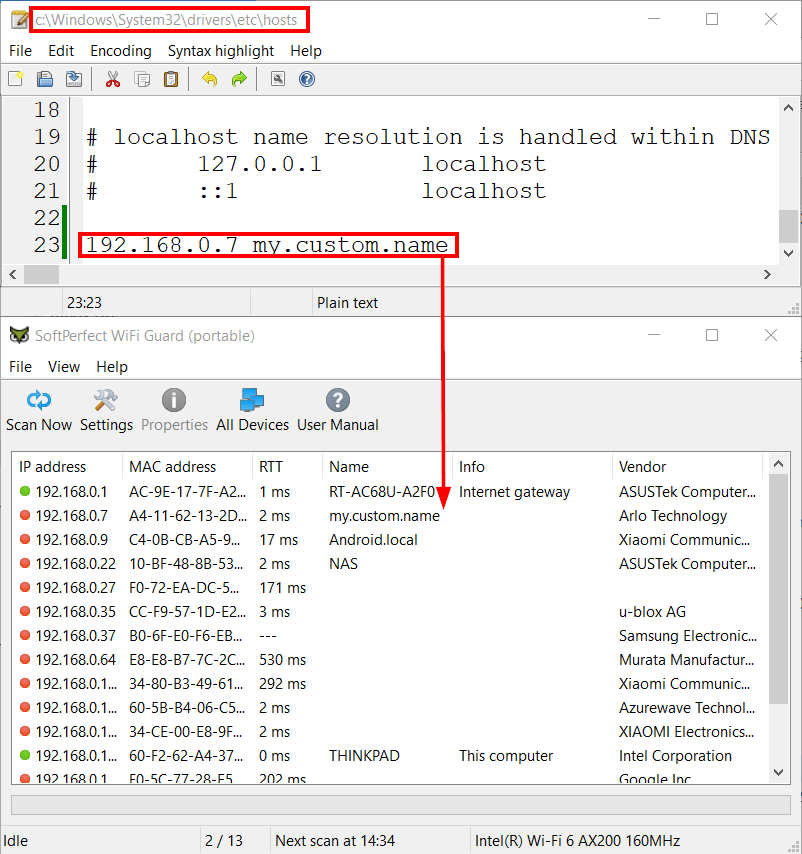
There is a workaround though. You can edit the hosts file located in C:\Windows\System32\drivers\etc\hosts. There you can manually assign domain-like comments to your static IP addresses as shown in the screen shot below. Windows will use these records for forward and reverse domain name resolution, so you will be able to distinguish these IP addresses in WiFi Guard and also connect to them using the associated domain names.
Brilliant, it works! I can live with that. (tu)
Thanks for the prompt response. Love your tool!