Ability to run minimized to tray
5 posts · Closed
Thanks for this program.
Is it possible to add the ability to run it minimized to tray? It is inconvenient for me to see the program window each time after turning my PC on.
P.S. Tried third party solutions like cmdow. But your program is still not automatically minimized at startup, even through additional utilities.
It sounds like you are trying to automatically start WiFi Guard from your own shortcut or registry entry.
Instead, simply tick the corresponding option in WiFi Guard's settings as shown below. After reboot it will start minimised to the notification area:
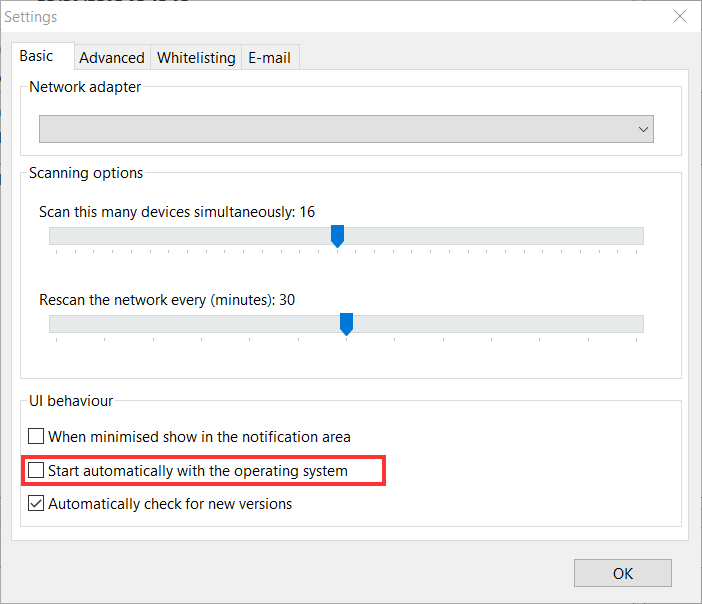
Thanks for answer. I checked it out. Yes, it starts minimized to tray, but only with default start.
In my case however, the program was added to the delayed autoload via Windows Task Manager (taskschd.msc). In other words, it starts from the native .exe no labels and without additional entries in the registry. But launched via delayed autoload in the full window and is not minimized by any means, including utilities. Sadly, when a huge number of programs are launched together with the OS, a delayed startup is a necessity. I may have to change the order of launch and move this program forward. Thank you.
Simply add the /hide parameter to wifiguard.exe. It will then start minimised.
If no parameter is given, it assumes a regular start and shows its main window.
Thanks! It works. Added to "Add arguments" /hide. Delayed autoload has been achieved, thank you.