Adding a disk
To create a RAM disk, choose Disk – Add in the main menu.
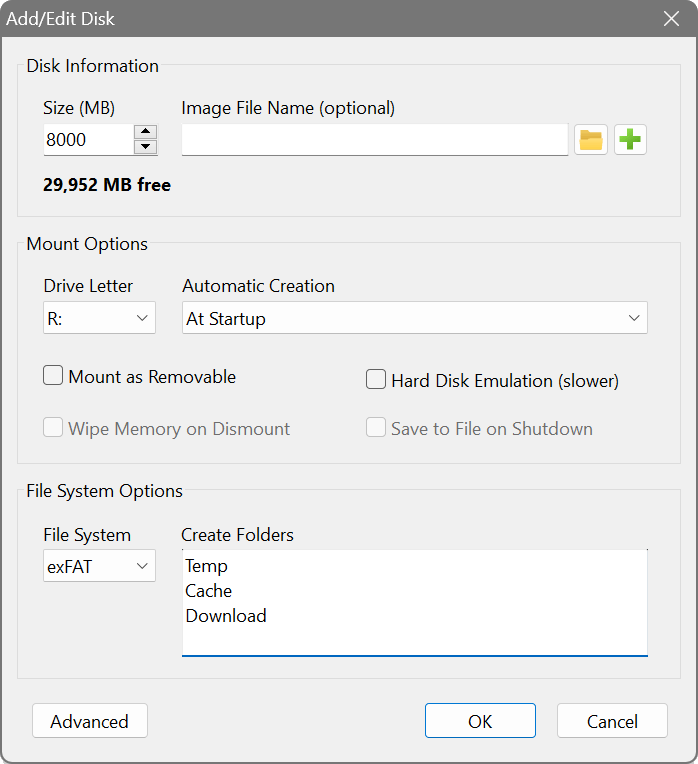
In the Disk Information section, specify the basic disk parameters:
- Size
- The disk size in megabytes. Leave empty when using an image file.
- Image File Name
- Full path to an image file for a persistent RAM disk that keeps its contents between sessions. Leave empty for a volatile disk that erases all its contents on shut down. The disk size is determined by the image file size.
The Mount Options control what happens when mounting and dismounting the disk:
- Drive Letter
- The drive letter to assign to the RAM disk.
- Creation
- Startup disks are created automatically on system boot. Manual disks require mounting by the user.
- Dynamic memory allocation
- Allocates RAM only as data is written to the disk, rather than reserving the full disk size upfront. This allows for more efficient memory usage. See dynamic allocation for more details.
- Automatically release memory (TRIM)
- Returns memory to the system when files are deleted from the RAM disk. Requires dynamic allocation to be enabled. The file systems that reclaim memory vary by platform.
- Hard Disk Emulation
- Emulates a complete hard disk drive with partitions indistinguishable from a real device. This extra layer of emulation is slower than a standalone volume, but can be helpful for specialised applications and disk utilities that do not work with standalone volumes, are unable to access them or produce I/O errors. If you intend to use an image file with this option, make sure you choose the Hard Disk type for your image file.
- Save to File on Shutdown
- Writes the current RAM disk contents to the associated image file on shutdown. Unavailable for volatile disks. If left unticked, the disk will be populated with the image file contents at the start, but will not save any changes made afterwards.
The File System Options control disk formatting:
- File System
- The file system to format the disk with. The available file systems depend on your operating system.
- Create Folders
- Names of empty folders to create automatically on the disk, one per line. Use these paths in other applications for cache or temporary file locations.