Licences and keys
- How long a licence lasts, and the update period
- Why the licence key does not work with a new version
- How to enter the licence key
- The licence key did not arrive, or was lost
- Renewing your licence with a discount
- Reinstalling, or moving a licence to another computer
- Trial and licensed software
How long a licence lasts, and the update period
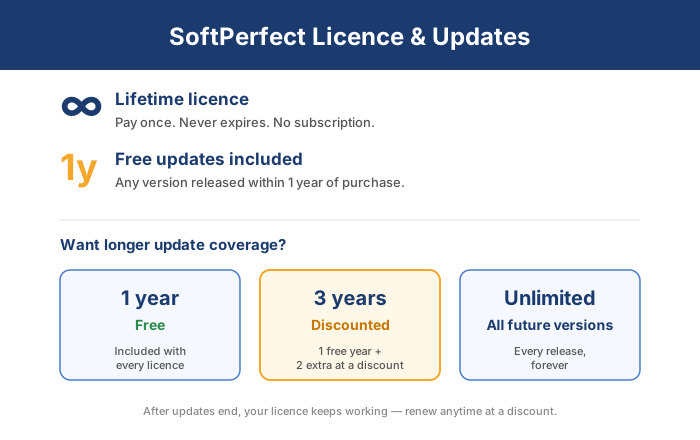
Every licence you buy is valid for ever and includes one year of free updates. Your licence key works, for ever, with every version released within one year of the purchase.
There is no subscription. You pay again only if you want versions released after that first year. You can buy longer updates at a discount together with the licence.
You can also renew your licence at a discount at any time after the update period ends.
We do not keep old versions of our software: only the latest version of each product can be downloaded from our site. If you want to keep using an older version, save copies of all its files while you still can.
Each product page has a Changelog link with the release date of every version.
Update periods
When you buy a new licence or a renewal, you can choose:
- 1 year: free with every licence. You can use, for ever, any version released within one year of the purchase.
- 3 years: the free year plus two more years at a discount. You can use, for ever, any version released within three years of the purchase.
- Unlimited: you can use every version we ever release.
Why the licence key does not work with a new version
A licence is valid for ever for the version you bought, and includes one year of free updates.
So your key always works with the version you bought and with every version released within one year of the purchase. It does not work with versions released later. You can buy longer updates together with the licence.
If you want to keep using an older version after your update period, keep a copy of its files: our site only offers the latest version of each product.
To use the new version, renew your licence at a discount. You can renew at any time after your update period ends and still get the discount.
How to enter the licence key
When you buy a licence, we send the licence key to the e-mail address you gave in the order form. The key is all you need to turn the trial you have probably already downloaded into the full product. You do not need to download or install anything else, connect to the Internet, or contact us. Just follow these steps:
- Open the order confirmation e-mail. The licence key is a few lines of letters and numbers between two markers:
------ KEY BEGIN KEY ------
...
a few lines of the licence key
...
------ KEY END KEY ------ - Copy the whole key, including the BEGIN and END lines.
- In the program, open the Help menu or the About window, depending on the product, and click Enter Licence Key. In NetWorx, right-click its icon in the notification area, point to NetWorx and click Enter Licence Key.
- Paste the key into the empty field and click OK.
Always copy and paste the key. Do not type it, as it is easy to make a mistake.
Some e-mail services add extra characters to the key and break it. If you copied the key carefully and it still does not work, tell us and we will send you the key again.
If you bought a licence recently and the key has not arrived, see the next section.
The licence key did not arrive, or was lost
The key did not arrive
Our orders are handled by PayPro Global. If you have not received an e-mail from them about your purchase, first look in your junk mail folder: even good spam filters make mistakes. If it is not there, check your order and get your licence key with our order lookup.
You lost the key
If you lost the e-mail with your licence key, you will find the key in our order lookup.
Still need help?
If the order lookup cannot find your order, or you have other questions, please contact us.
Renewing your licence with a discount
If you bought a licence for one of our products before, you can renew it at a discount. The product’s About window shows when your update period ends. After that, the product shows a message offering the renewal at a discount.
You do not have to renew straight away. The version you have keeps working as before; you just cannot use newer versions until you renew. You can renew at any time later.
If you have questions or need help with the renewal, please contact us.
Reinstalling, or moving a licence to another computer
A single-device licence lets you install and use the software on one device at a time. You can reinstall it on the same device as many times as you like: we do not lock the licence to a device or limit how often you install it, and activation needs no Internet connection or contact with us. The only rule is that the licence works only with versions released within its update period.
You can reset, upgrade or replace your device, and move the software to a new one. Just uninstall or delete the software on the old device, then enter the licence key on the new one. The same key works on every operating system the product supports.
Moving your licence between your own devices is not the same as transferring it. Our licences cannot be transferred or given to another person or organisation.
Trial and licensed software
We want you to try our software before you buy it, so a trial of every commercial product is available for download. Some products have a trial with no time limit but some features limited; others are complete, with a 30-day trial period.
To remove the limits or keep using the software after the trial, buy a licence and enter your licence key in the trial you already have. You do not need to download or install the software again.
Every licence and renewal includes one year of free updates. When a new version comes out after that, you can renew your licence to get it.