Introduction
Are your Internet costs rocketing? Does inappropriate use of your network have an adverse effect on your business performance? Did the Internet access bandwidth become a major bottleneck in your network?
If your network has any of these problems, SoftPerfect Bandwidth Manager will provide a cost-effective solution. The software monitors your network traffic and limits bandwidth in whatever manner you specify. The result is an immediate increase in the efficiency of your network together with a reduction in your overall bandwidth requirements while allowing important Internet applications to run at full speed.
SoftPerfect Bandwidth Manager is a full-featured traffic management tool for Windows that offers cost-effective bandwidth control and quality of service based on built-in prioritised rules. These rules can specify a bandwidth limit for each Internet user. The software of this kind is otherwise known as bandwidth limiter or traffic shaper. With its help, you can apply speed-throttling rules to specified IP and MAC addresses, ports and even network interfaces with no changes to your existing network infrastructure. The rich feature set of SoftPerfect Bandwidth Manager software is easily managed via the intuitive Windows GUI.
SoftPerfect Bandwidth Manager’s key features:
- Centralised configuration from a single network location.
- Flexible, prioritised, bidirectional rules to specify maximum data rates and usage allowances.
- Rules for IP and MAC addresses, protocols, ports (for TCP/IP) and network interfaces.
- Transparency for end users with no client software installation required in most cases.
- Quotas, scheduler, email notifications and comprehensive usage reports.
Software Installation
The software consists of two components: a Bandwidth Control Service and a Management Console.
The Management Console is usually installed on the system administrator PC. It is used to connect to the Bandwidth Control Service for monitoring and configuration.
The Bandwidth Control Service is essentially a filter that distributes bandwidth and enforces usage restrictions on the network connections that pass through. It should, ideally, be installed on the Internet gateway computer to manage user bandwidth usage as shown below:
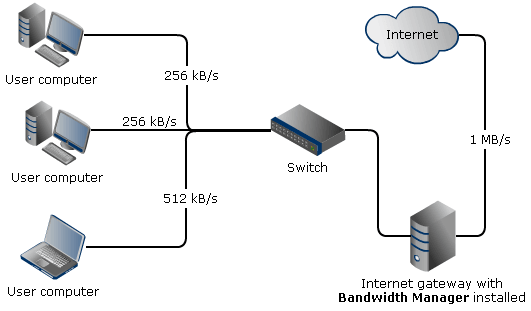
This may not always be possible. For example, network users may access the Internet through a hardware router or a DSL modem. In this case, the software will be effective if it is installed on user computers. Please see the examples to learn more about the installation on specific network configurations.