All Forums
> NetWorx
> Current topic
Background transparency in the floating graph
Started by Kirill
|
Kirill
Background transparency in the floating graph 30 September 2020, 09:37 |
|
|
Re: Background transparency in the floating graph 30 September 2020, 09:44 |
Admin Registered: 11 years ago Posts: 1 046 |
|
Kirill
Re: Background transparency in the floating graph 30 September 2020, 09:54 |
|
|
Re: Background transparency in the floating graph 30 September 2020, 10:05 |
Admin Registered: 11 years ago Posts: 1 046 |
To change the transparency of the graph background only, open the Hidden Options, scroll to the Transparent graph background and set it as you like.
|
Re: Background transparency in the floating graph 05 May 2022, 23:56 |
Registered: 6 years ago Posts: 3 |
|
|
Re: Background transparency in the floating graph 06 May 2022, 10:09 |
Admin Registered: 19 years ago Posts: 3 650 |
It unfortunately became incompatible with the anti-aliased drawing that NetWorx is now using to be consistent with the latest versions of Windows.
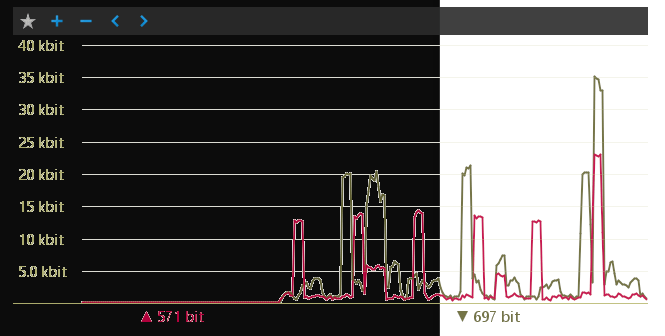
As the lines and text are drawn with antialiasing and blended with the background, it would look bad when the colour of the window behind is different. For example, if the background is white and the window behind is white, it looks good, but otherwise it does not:
As the lines and text are drawn with antialiasing and blended with the background, it would look bad when the colour of the window behind is different. For example, if the background is white and the window behind is white, it looks good, but otherwise it does not: