Password prompt when accessing Speed Meter
4 posts · Closed
I updated my NetWorx to the most recent version and now this new version asks me for a password. When I right-click on the network activity display in the taskbar to get to the Speed Meter, a window asking for a password pops up. I cannot recall using any password.
My second computer now shows the same password prompt although I didn't do any updates there. So something must have happened/changed recently with my NetWorx. What should I do now to get it working again?
OS: Windows
This is definitely not caused by NetWorx update. This simply means that a password for the access to NetWorx settings was set. If it were not you, then perhaps someone else with access to your computer did, e.g. a family member.
This article explains how you can recover the password and regain access to the entire NetWorx app.
Sorry, but I cannot find the database as indicated in that article: %PROGRAMDATA%\SoftPerfect\NetWorx.
When searching for e.g. "Softperfect" or "SoftPerfect/NetWorx" as in your example, nothing is found in my computer.
Where could it be situated and how can I find it?
It is a hidden folder, so Windows won't show it when you browse or search for it.
Instead please copy the line %PROGRAMDATA%\SoftPerfect\NetWorx and paste it in the File name field in the Open Database dialog of the DB Browser. Then click Open or press Enter. This will take you directly to the target folder without the need to look for it.
After that,
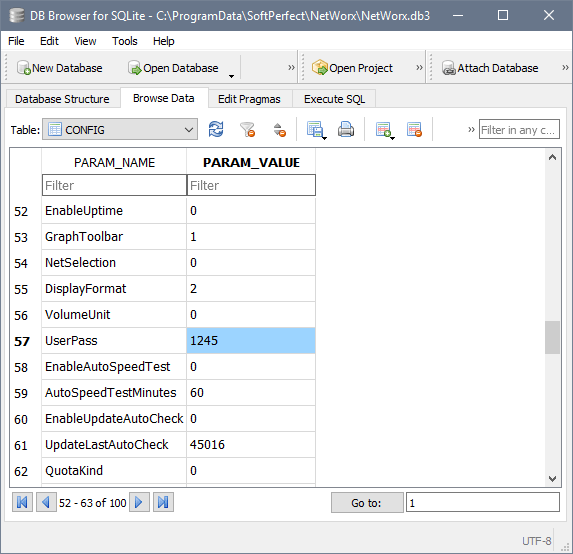
either go to the Browse Data tab, select the CONFIG table, and scroll down to the UserPass parameter that holds your password:
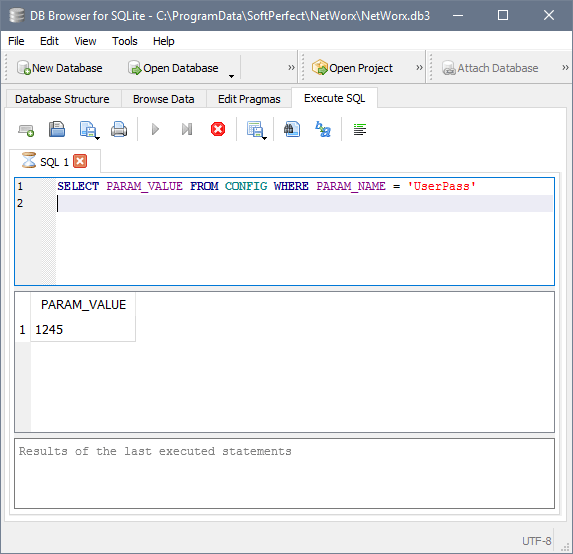
or go to the Execute SQL tab, paste and execute the following query:
SELECT PARAM_VALUE FROM CONFIG WHERE PARAM_NAME = 'UserPass'
Once you have found your current password, you can change or remove it in NetWorx.