How Speed Meter measures the speed
9 posts · Closed
Does Speed Meter post a calculated speed or measured download? It must be calculated, since you cannot be sending files to my ISP server. My router does not support SNMP.
The Speed Meter works by uploading random data of known size to a nearby server. The transmitted data volume is divided by the time taken, thus calculating the upload speed. Likewise, the download speed is calculated when a file of a known size is downloaded from that server.
Speed testing is not related to SNMP in any way.
I'm using a COMCAST 200 Mbps connection and wondering why I get so many different download measurements, at roughly the same time of day: NetWorx says the download speed is 120 Mbps. Comcast says it is 170Mbps. MLabs says 203 Mbps. Speedtest says 167. Speakeasy says 170 Mbps. Do you have a server in the Comcast data center in Boston? That is what my screen says. Are all the differences resulting from where the end server is located? In that case, MLabs must have a server right in my neighborhood.
We are using the same servers as SpeedTest.net does, though the testing procedure is a little different. I am afraid it's not really possible to say which one is right and which is wrong. Some tests report the maximum achieved speed, others report an averaged value... NetWorx can display both.
I have a similar question. See the attached file for differences.
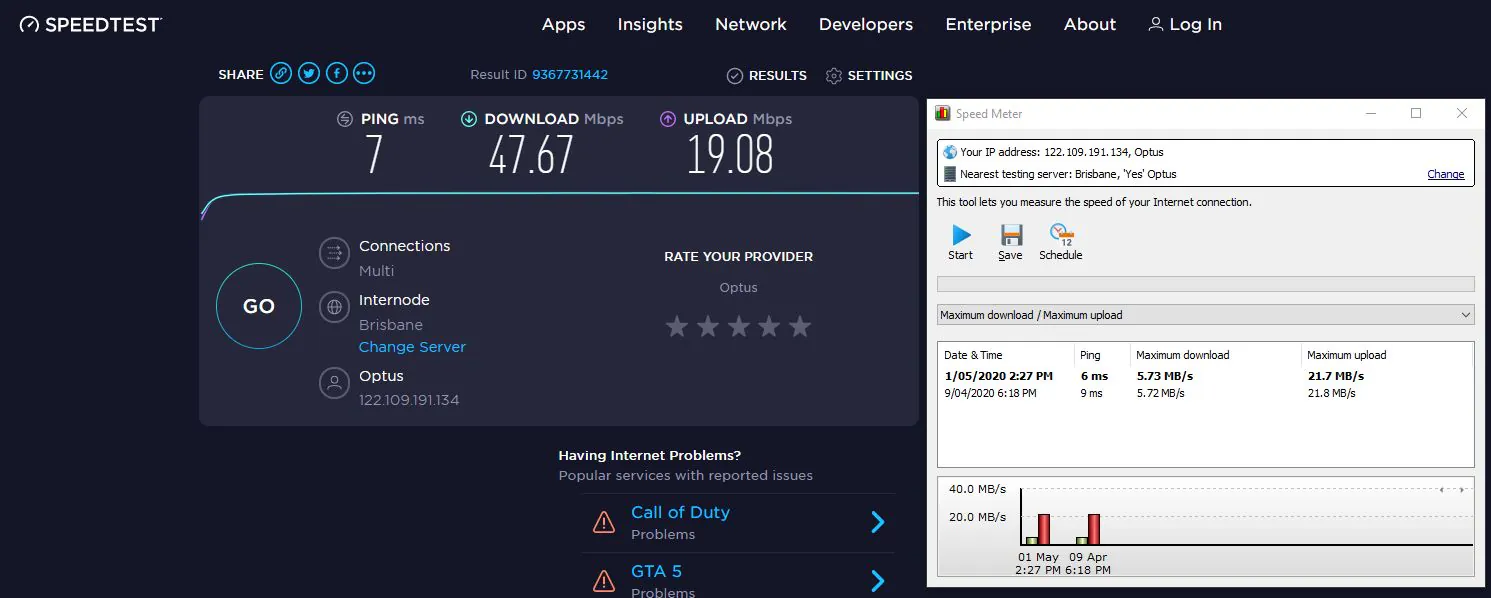
You are comparing megabits and megabytes, there is an 8-times difference. Please see this article for details. The download speed of 47 megabit is roughly 5 megabytes.
There is something wrong with the upload reading though. Please try using a different server by clicking the Change link in the Speed Meter's window.
Hi, I have tried changing servers but getting similar differences:
Networx reporting 16.0MB/s and Speedtest reporting 17Mbps (16MB/s x 8 = 128Mbs).
Maybe 1.6MB/s X 8 = 12.8Mbs would be closer?
The Downloads seem to be a good match at 5.68MB/s, and Speedtest reporting 39.84Mbps (5.68 x 8 = 45.44)
Hi,
Networx or Netgenius?
Do they do the same thing? Price seems same. I was just about to purchase Networx but....
Cheers
Please see this page explaining similarities and differences between NetWorx and NetGenius.
If you like the description of NetGenius, please download its free 30-day trial. Each user has different requirements and expectations, so we strongly advise everyone to always take advantage of the free trials, to make sure you are happy with the software before purchasing a license.