Speed numbers not showing in taskbar after Windows 11 update
14 posts · Closed
After updating to Windows 11, NetWorx stopped showing the speed numbers in the taskbar. It worked perfectly fine on Windows 10.
That's unfortunately going to be the case for each and every app with Windows 11, not just our NetWorx. Microsoft removed the extension functionality from the taskbar, so apps can no longer add their extensions to it.
Here is a quote from Windows 11 specifications:
microsoft.com, Windows 11 Specs wrote:
Feature deprecations and removals
...
Taskbar functionality is changed including:
People is no longer present on the Taskbar.
Some icons may no longer appear in the System Tray (systray) for upgraded devices including previous customizations.
Alignment to the bottom of the screen is the only location allowed.
Apps can no longer customize areas of the Taskbar.
Thanks. Now I have one more reason to keep Windows 10.
Any plans for a workaround or solution where speeds can be seen at a glance on the toolbar? I understand it may not even be possible but without it, the software is useless for me. I 100% use to see the speed on the taskbar at a glance.
Since Microsoft have crippled the taskbar, I am afraid apps can no longer customise its areas or install custom toolbars. We are working on a solution, but at this stage we cannot make any promises.
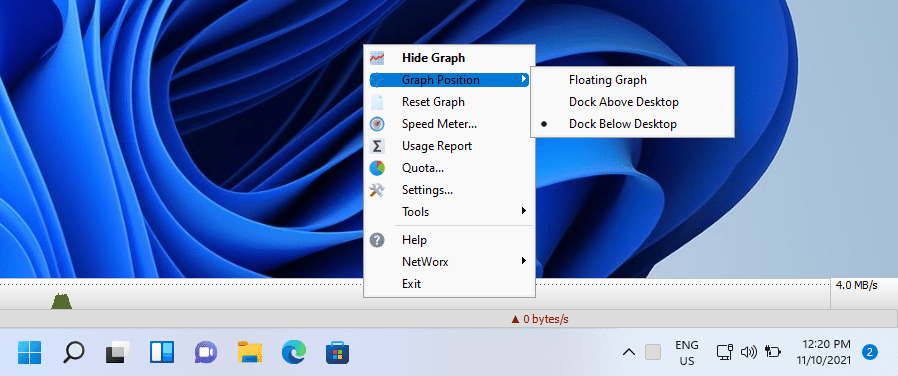
You could use a floating NetWorx graph sitting somewhere in a corner of the screen, or dock it above or below the desktop. In the latter case it will always be visible even with other windows maximised. If that's not suitable, you can stay on Windows 10 for the time being. There is a lot of outcry about this, and Microsoft might re-implement the old functionality at a later stage.
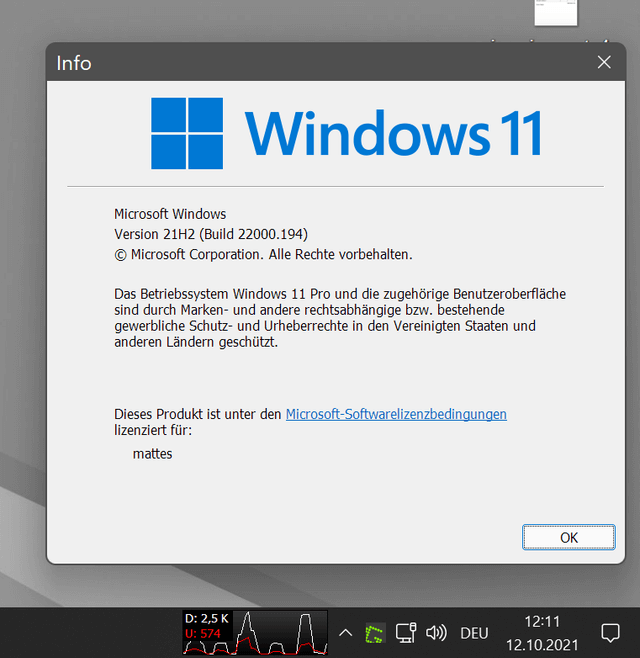
Works for me, but don't know why. Maybe because of startallback?
Indeed, we have tested this setup and it works. Looks like StartAllBack either enables the old taskbar buried somewhere in Windows 11, or provides its own implementation. Either way, it does a good job of improving usability. Thanks for sharing this tip!
Stumbled over the same after the upgrade to Win 11.
Currently I'm using the floating graph, but there's a problem that it does not stay on top of the taskbar, although "Always on Top" is set. It stays on top of application windows, but is covered by the taskbar.
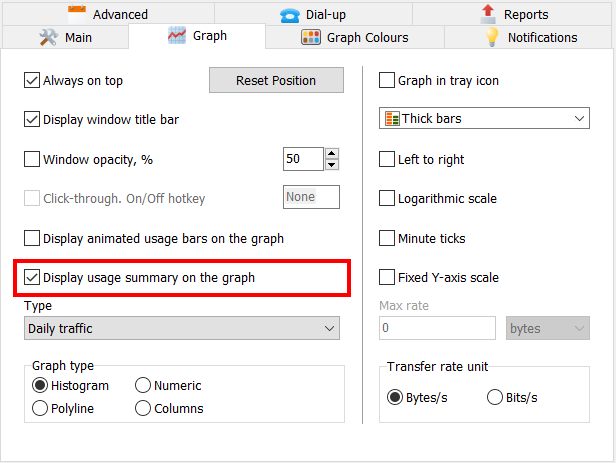
Additionally, it would be great if the items on the graph were customizable. E.g. I don't need the info "All Connections" or the date.
We have just checked, and it looks like Windows does not allow "always on top" windows to overlap the taskbar. This is the case in any system between Windows 7 and Windows 11. I suppose this is a Microsoft's design decision that top level windows are shown beneath the taskbar.
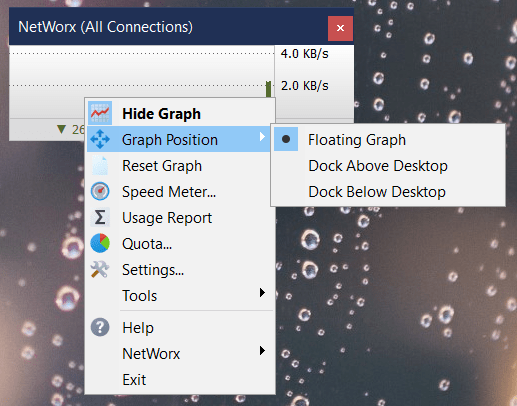
If you really want the graph to be visible at all times, it can be docked above or below desktop via the Graph Position setting in the popup menu. This will reduce the work area, but it will always be visible:
The additional information shown in the graph can be turned on and off with the "Display usage summary on the graph" setting on the Graph tab in NetWorx Settings:
Thanks for the info!
Found a workaround with AutoHotKey
- It does not work when the start menu is open
- Disable it with CTRL + NumLock
SetNetworxOnTop := true

SetTimer, ActivateNetworx, 1000

ActivateNetworx:
  If SetNetworxOnTop
    WinSet, Top, , ahk_class TGraphForm
Return

^PAUSE:: SetNetworxOnTop := !SetNetworxOnTop Good news for everyone who was missing the taskbar graph after updating to Windows 11: we have found a solution and included it in the latest version of NetWorx (7.0.3).

Hi,
This is great news for me. And I immediately tried the new Windows 11 taskbar Graph. It works, but my Histogram is placed in the vertical middle of the small window.
Any idea why?
Cheers,
Nicras
Hi again,
Found the reason by myself...
It was the "Minute ticks" setting. When enabled, the Histogram and other display variations are placed in the vertical middle.
Maybe a small bug or not? ;-)
Cheers,
Nicras
Thanks for reporting it. That was a small bug indeed. The minute ticks setting should have no effect on the taskbar graph as there is no space for them. We have just fixed this in the latest builds.