Unable to access mounted drive in Windows Explorer
4 posts · Closed
Hello,
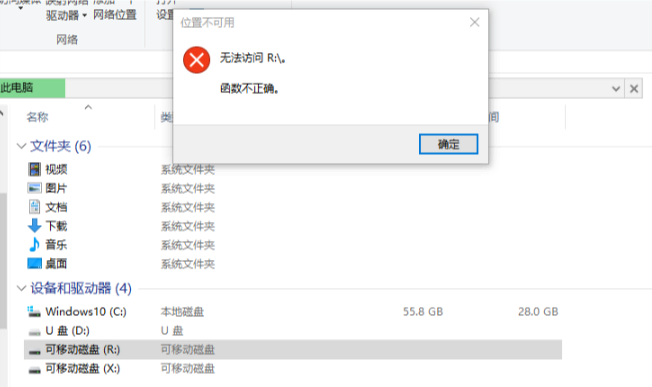
I am using the SoftPerfect RAM Disk for the first time; its version is 3.4.8 64-bit and it is on Windows 10. To follow the user manual, I created a 1024M image then mounted it. I can see this drive appear in Windows Explorer, but when I click that drive to access it, it shows me an error message meaning I cannot access it because the function is not correct?!
My purpose is to direct the cache file of Chrome and TEMP folders of the system to the RAM disk. I have tried, and even though there was a RAM disk drive built up, I cannot use the mklink command to redirect the default cache folder of Chrome to the drive, because I cannot access this RAM disk drive. How should I do?
Thanks very much for any help.
It's pretty strange, this error indicates that a component of Windows Explorer wasn't happy with the disk drive. It's likely to be due to some other installed software. As a workaround for this compatibility issue, try ticking Hard Disk Emulation (slower) and choose a different drive letter when mounting the image file.
Please note that creating and mounting an image file is not the same as creating a RAM disk. The commands under the Image item in the main menu operate with disk images. To create a RAM disk, use commands under the Disk item in the main menu.
Here is a bit more info on how to do some common tasks:
Hello, thanks for your soon help.
I know to creat a image is not the same creating a ramdisk. Because I have tried to creat a boot disk (ticking mount as removable, not ticking hard disk emulation), then I get a drive, but I can not access it from Windows Explorer, it shows the error message about not accessable like that I attached in this topic. Even I try to use the "mklink" command to make a "cache" directory in Google Chrome's data folder, it is failed. Due to this situation, I try to make an image to initiallize the ramdisk own the structure I need and then I get the same result as above: not accessible.
Anyway, by your suggestion I have ticked the Hard Disk Emulation and creat a ramdisk normally, it seems to go smooth. But I copy a folder from system disk (SSD) to the ramdisk and copy to another folder on the same SSD, to compare the performance between this two ways. That test folder's size is 275M and includes approximately 5000 files. I find out the performance of copying to ramdisk is poor than copying to SSD. So that means ramdisk solution is not sutable for my computer, right?
I would suspect that copying from the system SSD to the same SSD got that drive's cache filled up with the data, which resulted in a quicker operation.
I recommend to try copying from a RAM disk to the same RAM disk for comparison. You can also use the DiskMark app to compare performance in several I/O tests.