Slower Unreal Engine 4 build times on RAM Disk
7 posts · Closed
I looked at speeding up compile time for the build of Unreal Engine 4 (UE4) using Microsoft Visual Studio 2015 to build v4.15 of UE4, where the built and intermediate files are placed on the RAM Disk. The build normally takes 2195 secs but is longer on RAM Disk at over 2800 secs... Tried both NTFS and FAT32. This was done by using mklink to link folders from the SSD to the RAM Drive as mentioned in this article: https://wiki.unrealengine.com/Boost_Compile_Times
Perhaps something was not done correctly? For example, a common mistake is to create an image file and assign a drive letter to it. That's not a RAM disk and due to overhead its performance would be slightly worse than that of the disk where the image is stored.
Creation of RAM Disk is described here. You can then use this tool called Crystal Disk Mark to compare the performance of it and your SSD.
Thanks for the response. I have the CrystalDiskMark results from both my C drive and R drive (which is the RAMDisk). I have also attached the directory listing from the UE4 folder showing the directory junctions to the R: drive. Another thing I noticed is that deleting files from this also took a long time.
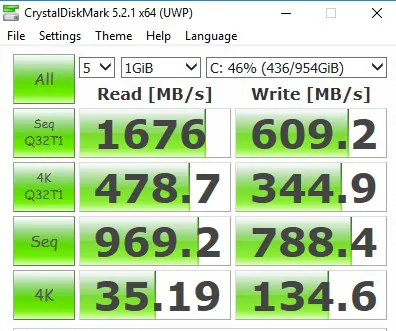
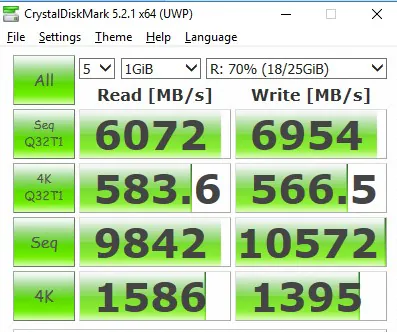
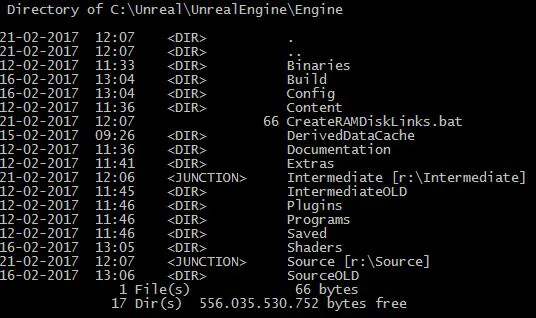
Thank you for the screenshots. I delved a little deeper and it turns out there's a significant performance issue with cross-drive NTFS junctions.
Unfortunately it looks like the only way around this is to either place the entire engine folder to a RAM disk or try to change the Source and Intermediate folders in the project/config file.
Yes that is the issue. I moved the whole thing onto the RAM Disk and it went from taking 2800 seconds (46 minutes) for a complete build down to 1280 seconds (21 minutes) which is great.
Thanks for your help.
Hello,
Hope it's OK to reply to an old topic. This problem with slow junctions concerns me a lot but I couldn't find much about it elsewhere. Do you know where I could find out if this, indeed, is a Windows bug and if it applies to Windows 10?
I'm on Win7x64 and all my my Windows Junctions such as My Documents, Desktop, Videos, etc. are redirected to other hard drives. There is no way, as far as I know, to force Windows to use symbolic links instead. What's worse, I have redirected these links on every computer I've fixed in order to keep the users documents separate from their OS in the future.
Am I slowing down Windows when I do this? Would a simple Disk Mark test through a junction vs a symbolic link tell that?
BTW, I did switch all of my cache and temp links to symbolic links in RAM Disk. Thanks for the advice there. No way to know if I'm getting better performance though.
This performance issue with cross-drive NTFS junctions is only noticeable if you read and write a large set of small files. It's probably just how Microsoft implemented NTFS junctions.
Having said that, if you want to keep user folders like My Documents, Videos, Desktop, etc in another location, it can be done by simply changing the path in the registry as per this article. No need to use NTFS junctions, as you can directly point these folders to any desired location.