RAMdisk size became limited to 4095 MB after Windows 10 1809 update
17 posts · Closed
I'm unable to create a ramdisk larger than 4095 MB on Windows 10 v.1809.
On Windows 10 v.1803 (same PC, dual-boot) there was no limit (I use a 30 GB ramdisk on 64 GB of RAM).
I can't figure out what I'm doing wrong - is it a bug?
When trying to create a disk with the size over 4095 MB, I see this error message:
Operation failed with status code = C000009A and image status code = Unknown reason
0 Der Vorgang wurde erfolgreich beendet
Screenshot with ramdisk size 4096 MB:
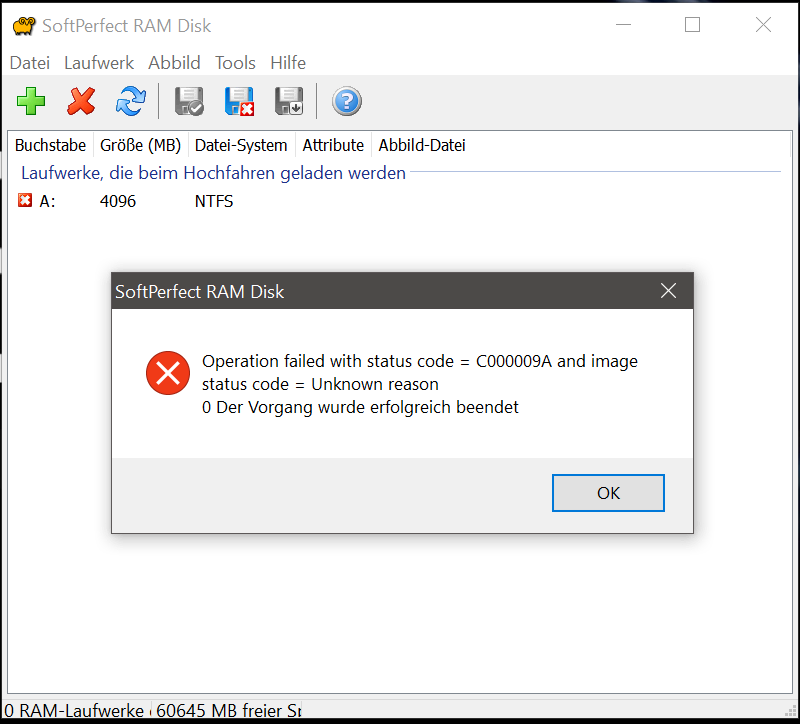
This issue seems to be caused by something Microsoft changed in Windows version 1809 and earlier builds of Insider Previews.
From our experience, things are often broken in Windows preview builds, so we'll check how it works once the release is out (it looks like it's only a few days away).
Andrew, thanks for your reply. My version of Win10 1809 17763 seems to be the official release (in a couple of days). So the Softperfect team should not wait too long to solve this problem. Okay, I'm the early bird on 1809, but without Softperfect RAM Disk my workflow is broken, I love my ramdisk. :-)
Good news here! We've investigated this issue, and though it's not clear why it is now happening, it is fixable.
It turned out Microsoft has changed something about memory limits in their allocation routines. In tech-speak, there is a function called MmAllocateNodePagesForMdlEx, where the documentation states:
The maximum amount of memory that MmAllocateNodePagesForMdlEx can allocate in a single call is (4 gigabytes - PAGE_SIZE). The routine can satisfy an allocation request for this amount only if enough pages are available.
This seems to be no longer true as of Windows 10 v1809 and the function fails to allocate the maximum amount. We will release a new version of the RAM Disk with this fix if the issue is present in the official Microsoft update.
That's good news, Andrew! Thanks again for your reply!
Looks like the issue is still present in build 17763 that has become the official release.
We will publish an update to the RAM Disk app in a couple of days to work around this problem.
I started having problems with loading RAM disk images after I updated Windows 10 to version 1809 (OS build 17763.1). I get these errors:
NT error code = C0000098: The volume for a file has been externally altered such that the opened file is no longer valid, image status = Image header is corrupted or not accessible.
Win32 error code = 0 The operation completed successfully
and
NT error code = C000009A: Insufficient system resources exist to complete the API, image status = Image load succeeded.
Win32 error code = 0 The operation completed successfully
Thanks SoftPerfect for the prompt responses (tu) Will be waiting for the fixed update of the RAD Disk.
In the meantime, is there a way I could use to access data in my RAM disk image files?
Gavin, you should still be able to mount images as regular disks via Image - Mount Image in the main menu and access your data.
- If mounting directly to a drive letter fails, it means the image file is corrupted, and the error is not related to the Windows 1809 update in your case. You may have to create a new image if the current one is broken.
- If mounting to a drive letter succeeds, the image is fine, and you can access your data this way until we publish an update for the RAM Disk with the fix for the issue caused by the Windows update.
Fixed: RAM Disk version 4.0.8 has been released and can now be downloaded from RAM Disk home page. It contains the fix for the Windows 10 1809 problem that caused errors for RAM disks larger than 4 GB.
Before updating, please check your free update period in the RAM Disk's About menu.
Working! Thanks to Andrew, Ann and Softperfect! I'm now able to install my RAM-Disk with a size of 30 GB (64 GB installed RAM). B-)
Thank you for the reply and the fix version!
I tried to mount my images to a drive letter as you suggested, and they mounted without any problems. So I could get my data out and I knew then that the images were definitely not corrupted.
Now the new RAM Disk version 4.0.8 fixed the errors and everything is working perfectly well. Thanks again! :)
Will you be fixing this for the freeware 3.4.x release?
No, the old free versions (and the conditions of their use) will remain unchanged: they can be used for as long as the user wishes, but no further development or support is provided for them.
Version 3.4 is five years old. RAM Disk has undergone significant redevelopment since then, including crucial improvements. If you prefer using the latest versions of Windows, you may have to reconsider your decision to stay with the older versions of auxiliary software.
Thanks for your answer/honesty.
So there is a solution for those of you out there that want to stay on 3.4.x: create multiple 4GB RAM disks:
- Create multiple 4000MB RAW RAM Disks
- Remove driver letters from RAM Disks created above
- Use Disk Manager to create a spanned disk across RAM Disks created above (Can also use striped I suppose but why bother.)
I'm still seeing the C000009A error on a 4096MB ramdisk after an upgrade to 4.0.8. Is there anything I should look for to diagnose this?
Have you rebooted the computer after installing the 4.0.8 update? The reboot is necessary for the drivers to be replaced.
If you have rebooted, and the error is still present, it is probably some other issue. In that case please submit a support ticket and attach screen shots and more details about your system, e.g. total RAM and Windows build number.