Nested folders error when creating RAM disk
2 posts · Closed
Hello. I have used SoftPerfect RAM Disk for several years on my Win 7 32-bit notebook. Now I upgraded to Windows 10 64-bit and installed SoftPerfect RAM Disk there also. When trying to create a RAM disk for temporary files, size 1000MB, no removable drive, letter Z, NTFS, with Z:\Temp, there always comes an error message: "Nested folders are not allowed on a boot disk".
Because this error message did not say anything else to me and because everything worked well on the 32-bit system, I uninstalled SoftPerfect RAM Disk completely, rebooted, and then looked if something was left on the disk, following your help guide for complete uninstallation. I rebooted again and installed SoftPerfect RAM Disk again. But again when trying to create a RAM disk for the temporary files the same error message appears.
Do you have an idea why I am getting this error?
Nested folders on a boot-time RAM Disk were not supported until version 4.0.4. If it worked for you before, you probably had a logon-time RAM disk on your Windows 7 system. Or, if you are sure you had a boot-time disk and now you are trying to create a Temp folder with no nested folders inside it, you may be getting this error because you are specifying "Z:\Temp" path in the RAM Disk settings. You should specify just "Temp", as shown in this example:
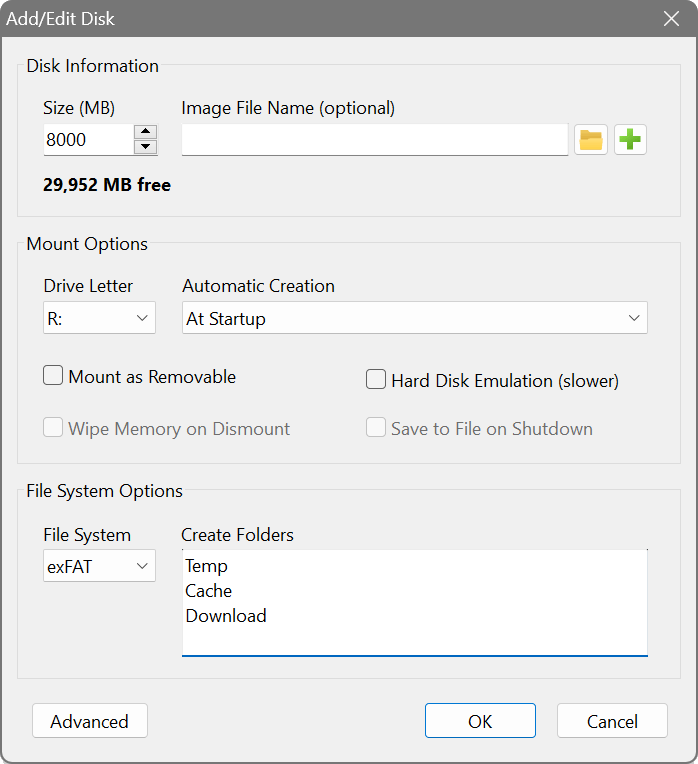
If you do require nested folders, you can either use a logon-time RAM disk, or update to the latest version. Please note that from version 4.0 the RAM Disk is no longer freeware: you would need to purchase a licence if you want to keep using it after the free trial period. For more information about changes in newer versions you can have a look at RAM Disk changelog.