Unknown vendor ImproComm on wifi
19 posts · Closed
There is a device in my house that registers on my Wi-Fi as vendor: ImproComm. I cannot identify the device. Could it be one of the devices I own?
- Att tablet 9020A
- HTC phone
- Samsung tablet
- Apple iPhone
- Chenkse tablet
- Dell laptop
- Windows Lumia phone
Thank you for your help.
Inprocomm is the vendor of network cards, it may or may not match the device's brand name.
It is definitely not the iPhone, and probably not the Dell laptop, but you should check the rest of the devices you listed. For that, make a note of the IP addresses reported as Inprocomm and then check each of the remaining devices settings to see which one of them has that IP address.
I have an unknown device on my network. Its manufacturer is InPro Comm. I have Comcast provider. Is there anyway to see the websites my devices have visited? Or any way to guess maybe someone could hack into them? This is the 4th time I have gotten unknown devices on my network. Thank you
WiFi Guard does not collect or keep lists of websites that devices visit. It is not one the Guard's functions, nor is it what it was designed for.
It is quite possible that the Inprocomm device is one of yours. As explained above, Inprocomm manufactures network cards. If a device has one of those cards, it may report its presence in the network using its network card vendor name rather than the brand name of the whole device.
There are two ways of identifying the detected unknown device:
- [Quicker, but you need to know where the network settings in each device are] Make a note of the IP address of the device that is reported as Inprocomm in WiFi Guard. After that, check network settings in each of your devices to see if one of them has that IP address.
- [Slower, but you don't need to check other devices' settings] One-by-one, switch each device off, wait for a bit, rescan the network with WiFi Guard, then switch the device back on, rescan again. This will pinpoint the device that disappears and then reappears in the scan results.
Bear in mind that these days TV sets, gaming devices, and even some robot vacuum cleaners have IP addresses and connect to the network.
I have inprocom invader on my wifi. I tried to block that user but he keeps on connecting to my wifi. He/she change her/his mac address every time i block it. How can i totally block this user?
Please see this page on how to keep your WiFi network secure. However, bear in mind that WiFi Guard cannot block other devices - it can only monitor your network and alert you about unrecognised devices, because it is technically impossible to block a device directly from an application. No other software similar to WiFi Guard can do it.
Hi. I had the same issue and want to inform others what it is in my case.
The Inprocomm device's MAC is the MAC-address of my car Android radio. It is establishing a connection to my router every time I start the car. And yes, the MAC address begins with 00:08:22, but the rest of the address changes every time.
I hope I helped.
Thank you for sharing your discovery.
By the way, WiFi Guard can automatically approve devices with dynamic last 3 octets. All you need to do is to go to Settings - Advanced tab - Partial match field and add the unchanging first part of MAC to Automatically approve devices whose MAC address starts with:
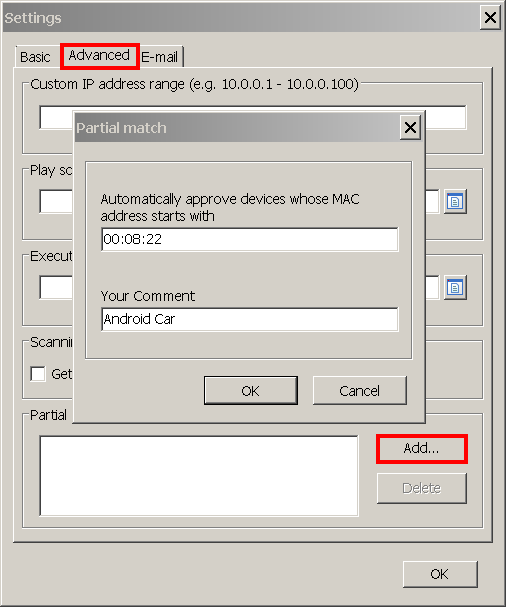
Had the same problem, which turns out to be not really a "problem". It's an Android phone, which has WiFi chip manufactured by Inpro. It changes MAC address every time it logs on to WiFi.
Inprocomm on my wifi is considered what for my security?
It is probably an Android phone like the above post suggested. You may find this article about WiFi Guard useful.
@Michael: InPro Comm is most likely your router's wifi itself. Probably has IP 192.168.1.*. So it is noting bad to your security in this case.
I have Inprocomm that keeps trying to connect to my Wi-Fi, it's really annoying, I had Router Limits, blocked it, but seems to keep popping up. Maybe some kids walk by my trailer to access the router? Is there a way to block this totally off the router... Thank you. I have about 13 devices on my guest list and 5 unknown that show up.
As already explained above, it is hard to tell what this device might be.
The company names shown in WiFi Guard are network card manufacturers resolved from the first three octets of the MAC address. In some cases, they may match the device brand, e.g. Apple, but in other cases it may be less obvious. In particular, because Inprocomm supplies network adapters to many other companies, it is often impossible to tell what device it is exactly.
The simplest way to try to identify a "strange" device would be to turn your Internet-connected devices off and on one-by-one, rescan with WiFi Guard each time, and watch when each device disappears and re-appears in the list during this process.
If after that you still have no idea what this device is, it makes sense to change your WiFi password and strengthen its security. Obviously, you then will have to reconnect all your devices. Please see this article for details.
I recently noticed the same device pop up on my network as well went through the same panic as others have stated. Then I remembered I recently added a WiFi extender. So maybe this could be the same for you guys as well? Just thought I'd chime in with my 2cents. Let me know if this helped anyone else out. Thanks. Have a great quarantined night and be safe. God love you.
The first time InPro Comm turned up in my network was when I installed a wifi camera.
In my case it was dns direct from remote access of modem, because before installing it from noip.com it did not appear in my wifi network.
My automotive High Scan tool registers as an InProComm device when it gets updates. So it could be anything, like your air conditioner, thermostat, whatnot.
In my case it's the tablet. I brought a Chinese tablet for my kids and I get this "Inpro Comm" when I scan my network.