Feature suggestion: Customisable sender for email alerts

Hi,
WiFi Guard has the ability to send an email when an unknown device is detected. An improvement would be to allow the use of a sending address that is different from the account user name. For instance, I would like the email to be sent from [email protected], but if that is not my user name, the program can't do it.

Please include this feature with the next software update.

Thanks.
SoftPerfect Support forum - Ann avatar image
Ann

Re: Feature suggestion: Customisable sender for email alerts   21 December 2021, 15:34

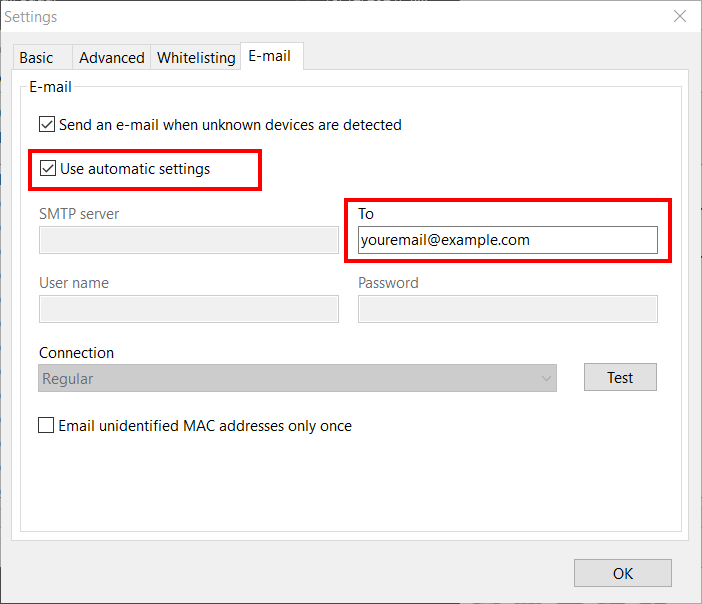
Many SMTP servers do not allow specifying a non-existent or someone else's sender email address. Therefore, we have instead updated WiFi Guard, so that it would use the product name as sender for emails. This change comes with a simplified SMTP setup where you only need to provide the recipient address, and there is no need to enter the username and password.

In WiFi Guard Settings, on the E-mail tab, simply tick Use automatic settings. After that, WiFi Guard will be using our SMTP server and the emails will be coming from WiFi Guard ([email protected])

SoftPerfect support forum

Reply to this topic

Sometimes you can find a solution faster if you try the forum search, have a look at the knowledge base, or check the software user manual to see if your question has already been answered.

Our forum rules are simple:

  • Be polite.
  • Do not spam.
  • Write in English. If possible, check your spelling and grammar.

Author:

Email:

Subject

A brief and informative title for your message, approximately 4–8 words:


Spam prevention: please enter the following code in the input field below.

 ********    ******     *******   ********         ** 
 **     **  **    **   **     **  **     **        ** 
 **     **  **         **         **     **        ** 
 ********   **   ****  ********   ********         ** 
 **         **    **   **     **  **         **    ** 
 **         **    **   **     **  **         **    ** 
 **          ******     *******   **          ******  

Message: