Ignore local traffic within the LAN option is greyed out
3 posts · Closed
Hello,
I installed the NetWorx program with the installer. But still, the "Ignore local traffic within the LAN" option is greyed out.
On this page it says that the option is not available in the portable edition, or anti-virus may be blocking the LAN Traffic Filtering Driver from being installed. Neither of those apply in my situation. During the installation, I simply did not see the way to add the LAN Traffic Filtering Driver.
How can I activate this option?
Regards,
Heinz
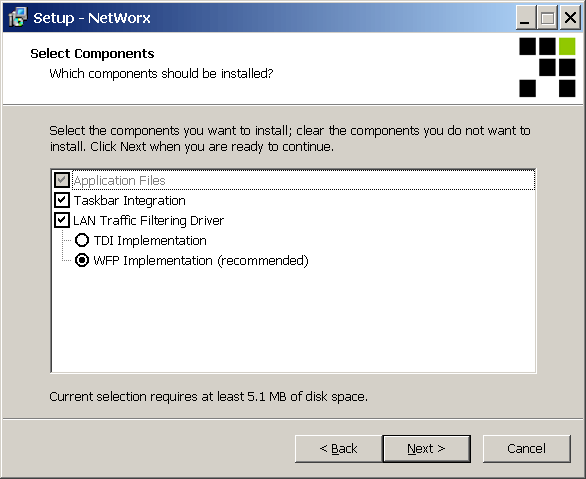
The LAN Traffic Filtering Driver can be selected on the fourth page of the installer program, as shown in the screenshot below. That page may not be displayed if an earlier version of NetWorx is already installed - in that case NetWorx installer honours the choice made by the user during the earlier installation.
You can "change your mind" and add the driver by reinstalling NetWorx from scratch. For that, please follow these steps:
- Backup your usage and settings via Usage Reports - Backup.
- Close and completely uninstall NetWorx, then reboot.
- Install the latest version using networx_setup.exe installer file, which can be downloaded from NetWorx page.
- Restore your backup via Usage Reports - Restore.
Thank you for the information. Everything works now.