General settings
The General tab contains the basic server configuration options:
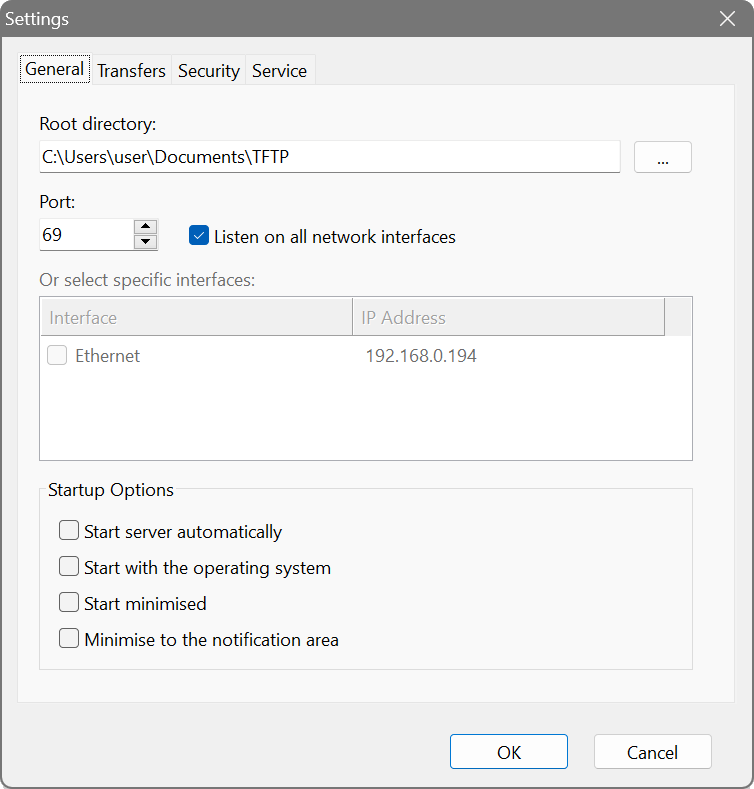
- Root directory
- The base folder for all TFTP operations. Files requested by clients are served from this directory, and uploaded files are stored here. Subdirectories are supported. The default location is the
TFTPfolder in your Documents. - Port
- The UDP port the server listens on. The standard TFTP port is 69. Ports below 1024 require administrator privileges on some systems. If port 69 is already in use or you lack permissions, you can use a higher port number.
- Listen on all network interfaces
- When enabled, the server accepts connections on all available network interfaces (IPv4 and IPv6). This is the default and recommended setting for most scenarios.
- Or select specific interfaces
- If you need to restrict the server to specific network interfaces, uncheck “Listen on all network interfaces” and select the desired interfaces from the list. This is useful when you have multiple network adapters and want to limit TFTP access to a particular network segment.
Startup Options
- Start server automatically
- When enabled, the TFTP server begins listening as soon as the application starts, without requiring you to click Start manually.
- Start with the operating system
- Launches the TFTP Server application automatically when you log in to Windows. Note that this starts the GUI application, not the Windows service. For unattended operation without user login, use the Windows service instead.
- Start minimised
- The application window will be minimised when it starts, keeping it out of the way while still running.
- Minimise to the notification area
- Instead of closing, the application hides from the taskbar and shows only as an icon in the system tray (notification area). Double-click the tray icon to restore the window.