Security settings
The Security tab provides access control and connection limiting options:
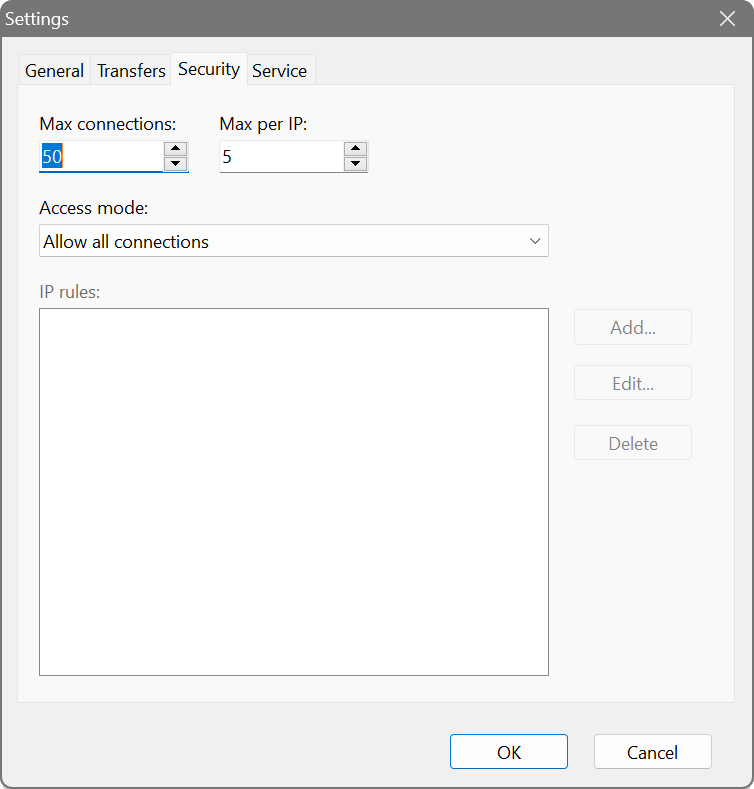
- Max connections
- The maximum number of simultaneous transfers the server will handle. Additional connection attempts are rejected until existing transfers complete. The default is 50. Increase this for busy servers or decrease it to limit resource usage.
- Max per IP
- The maximum number of simultaneous connections allowed from a single IP address. This helps prevent a single client from monopolising server resources. The default is 5.
- Access mode
- Controls which clients are allowed to connect:
- Allow all connections: any client can connect. This is the default and suitable for trusted networks.
- Allow listed only: only IP addresses matching the rules in the IP rules list can connect (whitelist mode).
- Block listed only: all clients can connect except those matching the IP rules (blacklist mode).
- IP rules
- A list of IP addresses or subnets used for filtering when Access mode is set to Allow listed or Block listed. Use the Add, Edit, and Delete buttons to manage rules.
IP rule formats
IP rules can be specified in several formats:
- Single IP: e.g.,
192.168.1.100or2001:db8::1 - CIDR notation: e.g.,
192.168.1.0/24(matches 192.168.1.0 - 192.168.1.255) - IPv6 CIDR: e.g.,
2001:db8::/32
Security considerations
TFTP is an inherently insecure protocol with no authentication or encryption. Consider these precautions:
- Use IP filtering to restrict access to known clients.
- Place the TFTP server on a dedicated network segment or VLAN.
- Use “Download only” mode if clients do not need to upload files.
- Limit allowed file extensions to only those required.
- The server includes built-in protection against path traversal attacks (attempts to access files outside the root directory).