Alert settings
Watching a wall of green dots is reassuring, but you cannot stare at it all day. The Alerts tab lets Ping Monitor tap you on the shoulder only when something is genuinely wrong – and then tell you about it however suits you, whether that is a desktop pop-up, an e-mail to your phone, or a script that opens a ticket.
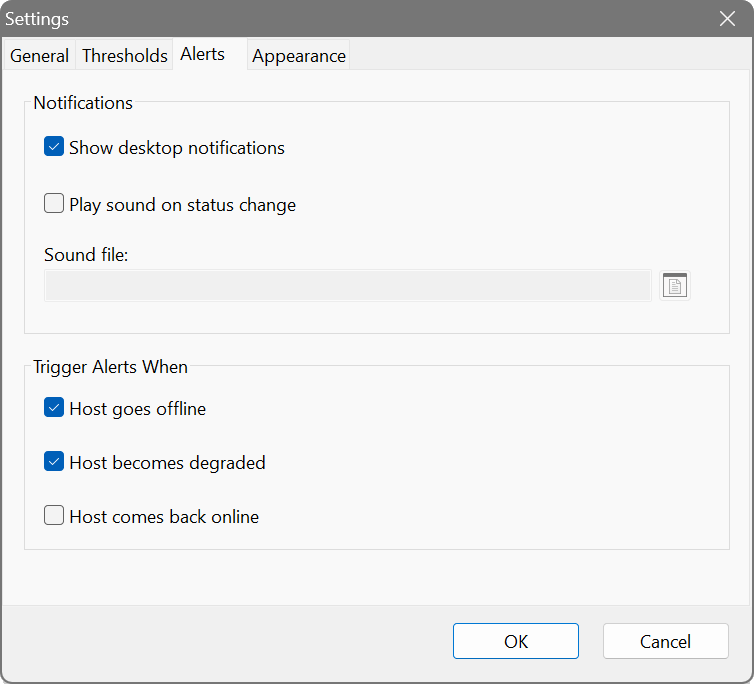
Alerting has two halves: the conditions that decide when a host is in trouble, and the channels that decide how you are told. You set them up once, globally, and they apply to every host you monitor.
Conditions: when an alert fires
Rather than reacting to a single dropped ping – which on a busy network happens all the time – Ping Monitor looks at a host’s recent behaviour over a rolling time window and alerts only when a problem is sustained. This keeps a momentary blip from waking you at 3 a.m. while still catching real outages quickly. Each condition fires once when it first becomes true, not repeatedly every second.
- High latency
- The host is still answering, but slowly. The alert fires when latency stays above a chosen number of milliseconds for at least a given share of the samples within the time window. For example: latency above 200 ms for more than 50% of the last 60 seconds.
- Packet loss
- The host is failing to answer at all. The alert fires when timed-out pings make up at least the chosen share of the samples within the time window. For example: more than 10% loss over the last 60 seconds. This counts non-responses only, so it is a clean signal that a host is dropping off rather than merely running slow.
- Failed probes
- A TCP or HTTP/S probe attached to the host is failing – the machine still answers pings, but the service running on it does not. There are no figures to set here: a probe has to fail twice in a row before it counts, so a single hiccup stays quiet.
Tick whichever conditions you want and set their figures. Because the first two are based on a share of recent samples, they adapt automatically to your ping interval – a slow ping rate will not silently disable alerting.
Channels: how you are told
Tick any combination of the three delivery channels. Each has a Configure… button for its details, and a channel only counts as active once it is actually configured, so a half-filled channel will not quietly swallow your alerts.
Show desktop notification
Pops up a notification toast on the desktop when a condition fires. Click Configure… to optionally attach a sound – pick any WAV file and it will play together with the toast (leave it blank for a silent notification). Use the Test button in the dialog to hear it.
Send email
Sends an e-mail describing which hosts are affected – ideal for forwarding to a phone or a shared mailbox. Click Configure… to set it up.
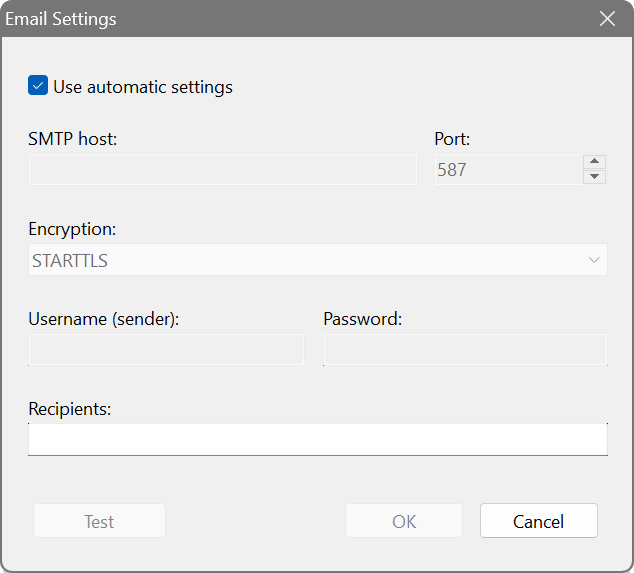
The quickest option is Use automatic settings, which sends through SoftPerfect’s own mail relay with nothing to configure – just enter a recipient address. If you would rather use your own server, untick it and fill in the SMTP details:
- SMTP host & port
- The address of your mail server. You can type host:port directly, or set the port separately.
- Encryption
- Choose the security your server expects: a plain connection, STARTTLS on the regular port, or a direct TLS connection on a dedicated port.
- Username (sender) & password
- The credentials for your mail account, if the server requires authentication. The username is also used as the sender address.
- Recipients
- Where the alert e-mail is sent. The dialog keeps OK and Test disabled until the address looks valid and the server details are complete.
Click Test to send a sample message and confirm everything works before you rely on it.
Execute program
Runs a program or script when a condition fires – the building block for almost any custom action, from raising a ticket to flashing a smart bulb. Click Configure… to choose the program and any command-line arguments. Ping Monitor passes the alert details to the program as environment variables:
- PINGMON_HOSTS
- The affected host names.
- PINGMON_KIND
- The kind of problem: latency, loss or mixed.
- PINGMON_COUNT
- How many distinct hosts are affected.
On Windows, .bat and .cmd files are run through the command interpreter automatically.
Cooldown period
When a whole subnet drops at once you want one alert, not a hundred. The Cooldown period (min) is a single global throttle: after an alert is sent, no further alert goes out until the cooldown has elapsed. Any hosts that run into trouble during the lull are not forgotten – they are counted, and the next alert appends a “+N more since last alert” line so a spreading outage is never hidden.
Testing your setup
The Test button on the Alerts tab fires the enabled desktop, sound and execute-program channels straight away with sample data, so you can confirm they behave as expected. E-mail is tested from its own Configure… dialog, which reports success or failure directly.
You suspect your broadband drops out for short spells during the day. Add your ISP’s gateway or a reliable public host, then enable the Packet loss condition at, say, more than 20% over the last 120 seconds. Tick Show desktop notification and leave the sound off. You will get a discreet pop-up each time the line genuinely struggles – useful evidence for a support call – without being pestered by the odd lost ping.
For a production server, enable both High latency (above 150 ms for more than half of the last minute) and Packet loss. Tick Send email and point it at a mailbox that forwards to your phone. Set a Cooldown of 15 minutes so a sustained incident sends one clear message rather than a flood. If several servers wobble together, the e-mail’s “+N more” line tells you straight away that it is wider than one box.
Tick Execute program and point it at a small script. When an alert fires, your script reads PINGMON_HOSTS, PINGMON_KIND and PINGMON_COUNT from the environment and posts them to your helpdesk or chat tool’s API. With the cooldown in place you get one ticket per incident instead of one per ping.