General settings
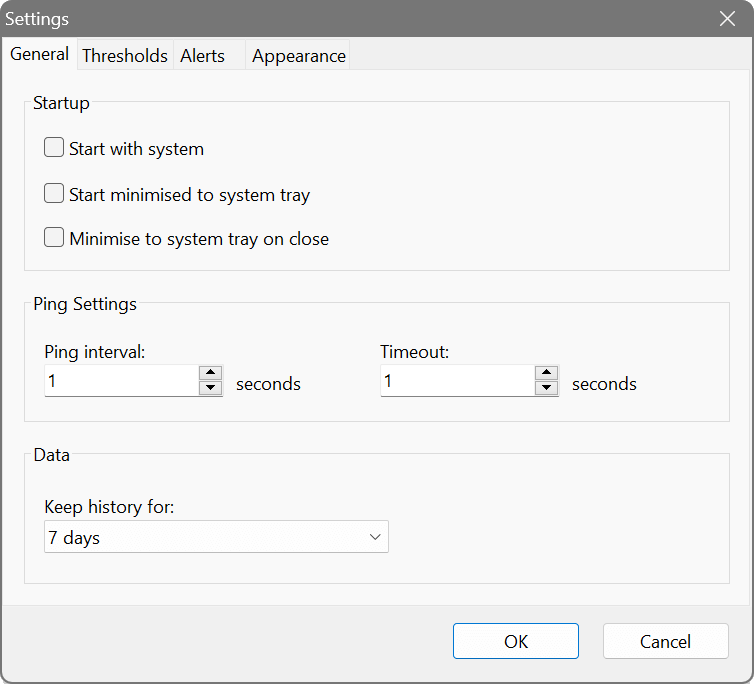
Startup
- Start with system
- Launches Ping Monitor when you log in and picks monitoring up where it left off.
- Start minimised to system tray
- Starts out of the way, in the tray, with monitoring running behind the scenes.
- Minimise to system tray on close
- The close button hides the window instead of quitting, so a stray click cannot end your monitoring. Double-click the tray icon to bring it back.
Ping
- Ping interval
- How often each host is pinged, in seconds. The default of 1 second suits a handful of hosts on a local network; stretch it out if you are watching dozens, or working across a link where traffic costs something.
- Timeout
- How long to wait for a reply before counting the ping as lost, in seconds. The default 3 seconds is generous for most networks – raise it if a genuinely distant host keeps showing losses it does not deserve.
Data retention
- Keep history for
- How many days of ping history to keep before older records are purged. The default 7 days is enough to spot a weekly pattern; go longer if you are building a case for someone, and expect the database to grow to match.
Interval and timeout apply to every host. The only things an individual host can override are its latency thresholds and its tags, both in the Edit Host dialog.