Integration with Nmap
The Network Scanner can integrate with Nmap, a free console-based tool for advanced network scanning including OS detection, service version probing and NSE scripts. It comes with a collection of scripts for advanced discovery, vulnerability testing and malware detection. Choose Options → Integration with Nmap from the menu.
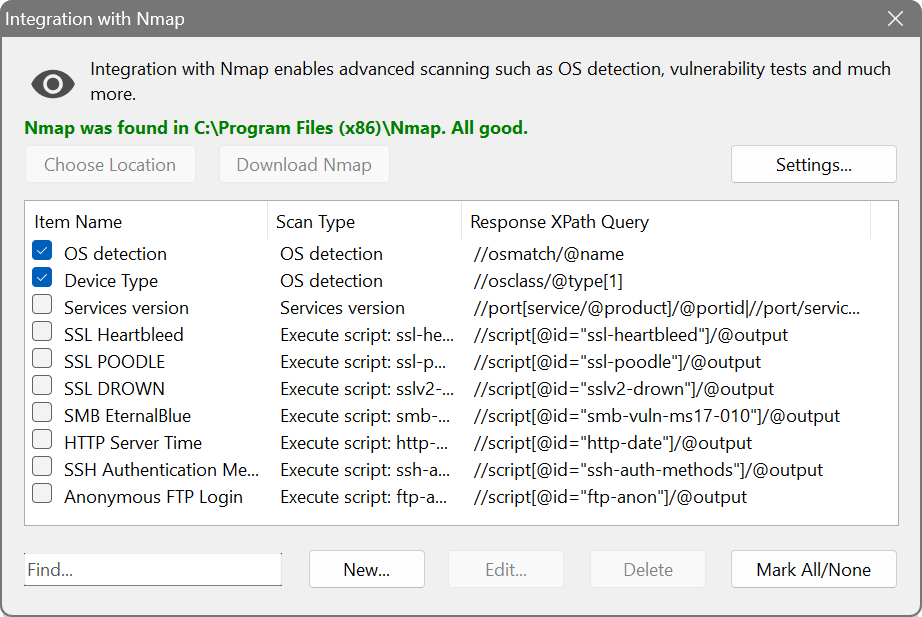
The dialog shows three columns: Item Name, Scan Type and Response XPath Query. When creating a new entry, choose the scan type:
- OS detection: identifies the operating system. Options include limiting detection to promising targets and guessing more aggressively.
- Service version detection: probes open ports to determine the service and version. Available modes: fast, standard and thorough.
- Execute script: runs an Nmap NSE script.
Nmap is executed with the configured parameters, and its XML output is parsed with the specified XPath expression. The extracted data then appears in the scan results. You can also configure port inclusion/exclusion and custom command-line parameters in Settings.
Create an Nmap entry with the OS detection scan type and an XPath query to extract the OS name. After scanning, a new column will show the detected operating system on each device, including Linux, macOS and embedded systems that Windows-based lookups cannot identify.